

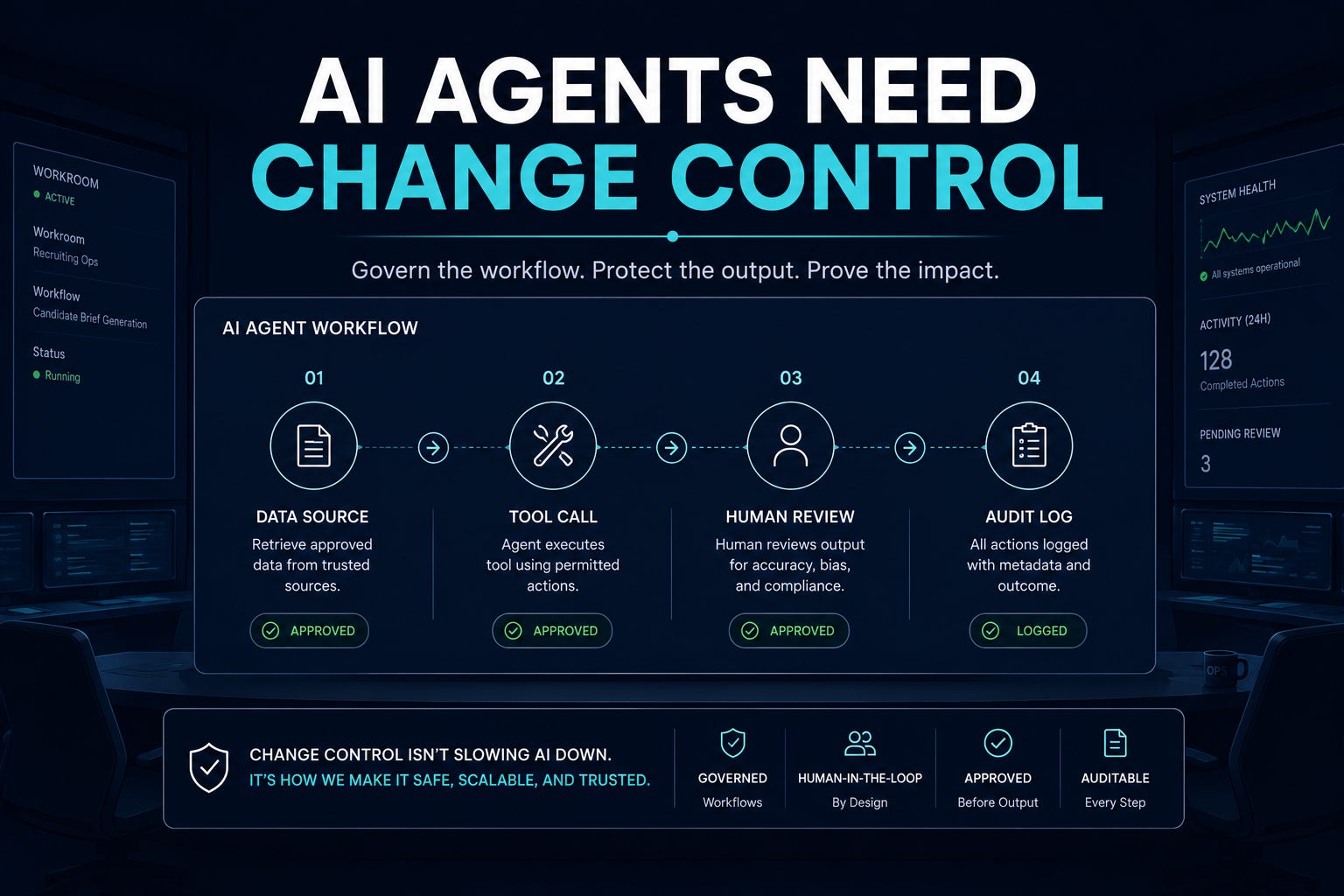
The biggest AI risk in recruiting is no longer the model. It’s everything connected to it. AI can now search Drive, call tools, retrieve candidate data, create artifacts, remember prior work, and act through delegated accounts. That changes what recruiting operations needs to govern.
When AI only drafted text, governance could focus on prompts and review. When AI starts moving through tools and enterprise surfaces, the question becomes: who approved what the system can see, what it can do, what it remembers, what it logs, and what changes after launch?
Recruiting teams need AI change control before they need more AI access.
A stronger model does not fix an unreviewed workflow.
Related: AI Recruiting Needs Task Queues
2-Minute Skim
3 things to know
Microsoft showed how poisoned MCP tool metadata can turn a trusted agent into a data-loss path without exploiting the model itself.
GitHub added Copilot session streaming, enterprise managed settings, usage accuracy improvements, and AI credit pools: the admin layer is catching up to agent usage.
Google expanded Gemini across Drive mobile, Slides generation, data regions, and delegated mobile Gmail: AI is moving into everyday recruiting execution surfaces.
2 things to test
Create an AI change-control checklist for any recruiting agent, connector, browser extension, or automation that can read or act on candidate/workflow data.
Run a 60-minute Drive/Workspace retrieval audit: pick one req folder, ask Gemini/AI search five operational questions, and verify source accuracy, permission boundaries, and missing context.
1 thing to ignore
Model-launch scorekeeping. Claude Sonnet 5 matters if it lowers the cost of reliable delegated work. It does not matter if your team still lacks review gates, logs, and tool-change approvals.
Executive Brief
AI execution became more connected this week. Anthropic launched Claude Sonnet 5 with stronger agentic performance and Claude Science with auditable artifacts and reviewer agents. Microsoft published a practical MCP tool-poisoning attack pattern for agents that move from reading to acting. GitHub shipped more enterprise Copilot controls: session streaming, managed settings, better usage metrics, and AI credit pools. Google pushed Gemini deeper into Drive mobile, Slides, data-region controls, delegated Gmail, and admin scoping.
What many teams will get wrong: they will keep governing prompts while ignoring tool metadata, browser extensions, Drive permissions, mobile access, cost pools, and generated artifacts. The risk is what the connected workflow lets the model see, remember, package, send, or spend.
What to do instead: make AI change control a recruiting ops habit. Every AI-enabled workflow should have an owner, approved tools, source boundaries, data-region posture, extension policy, spend cap, session logging, human approval for high-impact actions, and a review rule for any tool description or connector change.
Patterns
Agents are becoming supply-chain systems. Tool descriptions, connectors, browser extensions, and MCP servers now deserve the same review discipline as prompts and policies.
AI governance is moving into admin surfaces: managed settings, data regions, session streams, cost pools, OU-level delegation, and DLP.
Retrieval is going mobile. Recruiters will increasingly ask AI questions from Drive, Gmail, and phones, not just desktop chat windows.
Generated artifacts are becoming native work product: editable slides, auditable notebooks, source-grounded summaries, and session histories.
Cost and telemetry are becoming operational signals, but most TA teams still do not map usage to workflows or outcomes.
What Matters This Week
1. The agent risk moved from answers to execution
Microsoft’s latest agent-security research describes a tool-poisoning pattern where an MCP tool’s visible name stays normal, but the underlying tool description changes. Because agents use that metadata to decide when and how to call tools, the changed description can effectively become a hidden instruction layer. The agent may still appear to be doing approved work, while collecting or sending data beyond the user’s intent.
Any AI workflow connected to an ATS export, Drive folder, inbox, sourcing database, scheduling tool, enrichment provider, or browser extension has a supply chain. The model is only one part of it. The connector, tool metadata, publisher, permission scope, data destination, and logging path all matter.
Recruiting use case: Any recruiting agent connected to ATS exports, Drive folders, email, scheduling, or enrichment tools needs tool-metadata review before production use.
If your review process approves the vendor brand but never reviews connector behavior, tool-description changes, or outbound data paths, you have a gap. Treat tool descriptions like system prompts, and treat connectors like production dependencies.
2. Admin controls are becoming the operating layer
GitHub introduced Copilot agent session streaming for enterprise customers, making prompts, responses, and tool calls available through streaming or API access. The pattern matters for recruiting: sensitive AI work should leave an evidence trail.
If an AI assistant touches candidate data, intake context, interview plans, sourcing research, or funnel reporting, the team should be able to answer:
What did the person ask?
What sources did the AI use?
What tools did it call?
What output did it create?
What did a human change?
Where is the artifact stored?
Did the work influence a hiring decision?
Recruiting use case: Sensitive workflows need logs of prompts, source access, tool calls, reviewer decisions, and output disposition.
Enterprise customers can stream Copilot prompts, responses, and tool calls across clients into audit systems or SIEMs. If agent work is not observable, it should not touch candidate data or operational systems.
“Trust us, recruiters are using it responsibly” is not a control. Logs are a control.
3. GitHub managed settings show how enterprise AI standards should be enforced.
GitHub also made enterprise managed settings generally available, including settings that can govern plugin markets, enabled plugins, bypass controls, and model choices. Recruiting teams need the same idea for TA AI: approved tools, blocked plugins, allowed models, data boundaries, and exceptions that cannot be casually bypassed.
Recruiting use case: Centrally managed AI settings for approved tools, blocked plugins, allowed models, and bypass rules.
Policy documents are weak unless settings enforce them. If every recruiter can override the AI rules locally, you do not have AI governance.
4. Mobile retrieval needs rules
Google expanded Ask Gemini in Drive to mobile, letting users ask questions against Drive content from phones. Google says the feature operates with existing Workspace permissions and controls, which is important. It is not sufficient by itself.
Recruiting work is full of documents that look easy to summarize and misuse: role briefs, intake notes, interview plans, sourcing lists, hiring-manager emails, process guidance, and funnel reports. Mobile retrieval will save time. A recruiter walking into a hiring-manager meeting can ask for the latest role context without digging through folders. But convenience changes behavior. When AI retrieval becomes a phone habit, teams need rules for what can be searched, cited, summarized, copied, shared, and treated as operational truth.
Recruiting use case: Start with one low-risk req folder. Ask five practical questions:
What does the hiring manager want changed in the intake?
What are the unresolved scorecard questions?
Which interview-plan steps are missing?
What process guidance applies to this req?
What source did the answer rely on?
Then review the answers. Did it find the right file, miss newer context, or surface something the recruiter should not have used?
Mobile retrieval should earn trust through source fidelity, not convenience.
5. Better models still need receipts
Anthropic launched Claude Sonnet 5 with stronger agentic performance, tool use, and lower-cost execution. Better execution can make delegated recruiting ops work more practical.
Operators should use cheaper, stronger execution to run more verification. Ask for source maps. Require cited facts. Keep assumptions separate from evidence. Store reviewer notes. Keep decision language with humans. Anthropic’s Claude Science workbench points in the right direction: auditable artifacts, reproducible work, reviewer agents, and computing history. Recruiting should borrow the artifact standard.
Recruiting use case: Test lower-cost delegated workflows: intake cleanup, scorecard QA, sourcing-list normalization, hiring-manager update drafts, and recruiting ops reporting.
A funnel insight generated by AI should include source data, metric definitions, assumptions, transformation steps, and a reviewer note. A candidate packet should separate facts from open questions. An intake summary should cite the source for each requirement. The future of recruiting AI is work product with receipts.
Related: AI Recruiting Needs Evidence
Step-by-Step Playbook: AI Change Control for Recruiting Workflows
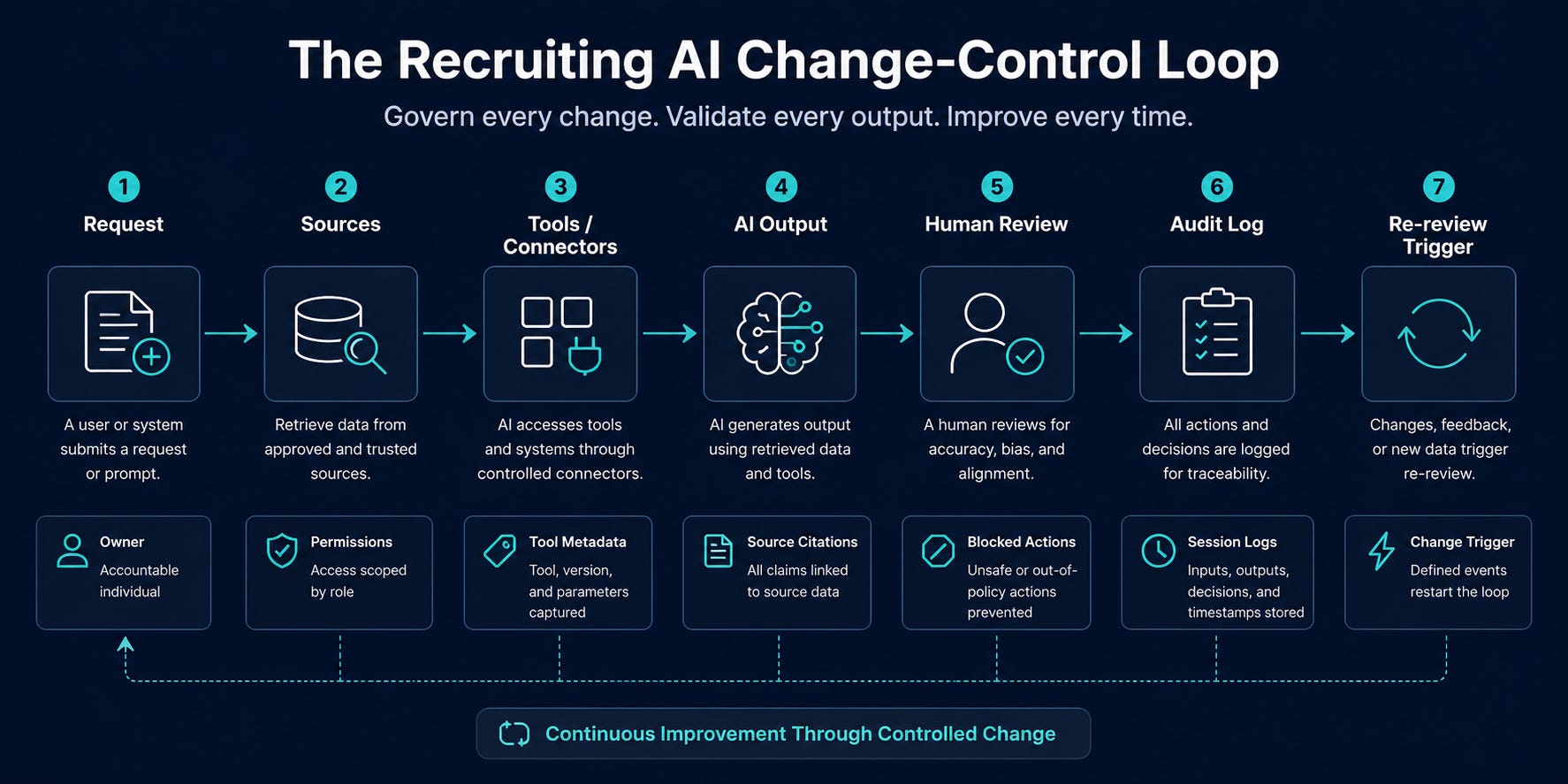
Use case
Use this before any AI assistant, agent, automation, browser extension, or Workspace/Copilot/Gemini feature touches recruiting data, candidate communications, hiring-manager notes, sourcing lists, interview plans, or funnel reports.
Tools
Inventory tracker in Sheets, Airtable, Notion, Jira, or your GRC system
Admin consoles for Workspace, Microsoft 365, GitHub/Copilot, Slack/Teams, browser management, and ATS integrations
AI session logs or audit exports where available
DLP, retention, data-region, and legal-hold guidance from IT/legal
One recruiting ops owner and one security/admin reviewer
Setup
Pick one workflow, not one tool: intake cleanup, candidate packet generation, sourcing research, interview-plan QA, funnel reporting, or hiring-manager updates.
Name the workflow owner and backup owner.
List every data source the AI can read: ATS fields, Drive folders, Gmail accounts, Slack/Teams channels, calendars, spreadsheets, notes, and external enrichment tools.
List every action the AI can take: summarize, draft, classify, search, create file, send message, update field, call API, run script, or export data.
Classify the workflow by risk: read-only, draft-only, internal action, external message, system write, or decision influence.
Decide the required control level before testing.
Change-Control Checklist
Workflow name:
Owner:
Business purpose:
Approved users:

Allowed data sources:
Blocked data sources:
Allowed actions:
Blocked actions:

Approved tools/connectors/extensions:
Tool descriptions reviewed: Yes/No
Connector publisher verified: Yes/No
Browser extension allowlisted: Yes/No
Data region confirmed: Yes/No/Not applicable
Retention/legal hold confirmed: Yes/No

Human approval required before:
- external candidate message
- stage movement
- rejection/recommendation
- compensation guidance
- ATS/HRIS write
- bulk export

Logging available:
Prompt/session logs:
Tool call logs:
Output storage location:
Correction log owner:

Review cadence:
Change triggers:
- new connector
- changed tool description
- changed permissions
- model default change
- new data source
- new output destination
- cost/budget change
Common Mistakes
Approving the tool brand instead of the actual connector, extension, permissions, and tool metadata.
Letting AI search all Drive content when one folder is enough.
Treating generated summaries as evidence without source links.
Allowing mobile retrieval before defining what can be shared from a phone.
Measuring adoption without correction rate, source fidelity, policy flags, or time saved.
Prompts
You are reviewing an AI workflow for recruiting operations risk.

Workflow: [describe workflow]
Data sources: [paste list]
Allowed actions: [paste list]
Tools/connectors/extensions: [paste list]
Users: [paste roles]

Identify:
1. data the AI should not access
2. actions that require human approval
3. tool or connector changes that should trigger re-review
4. logging gaps
5. retention/data-region questions for IT/legal
6. the minimum safe pilot scope

Return a concise risk register with severity, control, owner, and test method.
Audit this AI output before it is used in recruiting operations.

Output: [paste AI output]
Source materials: [paste or list source docs]
Intended use: [candidate packet / intake summary / hiring-manager update / funnel report]

Check for:
1. unsupported claims
2. missing source citations
3. protected-trait inference
4. decision language that should belong to a human
5. stale or conflicting data
6. unclear next action

Return: Pass / Revise / Block, with exact fixes.
Workflow
Run inventory before enabling the workflow.
Remove any data source or action that is not required for the first test.
Review connector metadata with the same rigor you review system prompts.
Disable broad “allow all” tool behavior where possible.
Require human approval for candidate-facing, ATS-writing, compensation, ranking, rejection, or stage-change actions.
Store outputs in a controlled location with source links and reviewer notes.
Review the first 10 outputs manually and record corrections.
Re-review whenever a connector, model, permission, extension, or data source changes.
When NOT to Use This
Do not use AI for candidate ranking, rejection, protected-trait inference, compensation recommendations, or unsupervised candidate messaging.
Do not connect AI to ATS write access until read-only and draft-only workflows have passed QA.
Do not use third-party browser extensions for recruiting work unless IT has allowlisted them.
Do not use AI retrieval for sensitive candidate matters if data region, retention, and auditability are unknown.
Expected Outcomes
30-60 minutes to map one workflow.
20-40% reduction in manual drafting or document-retrieval time for low-risk workflows.
Fewer unsupported claims in candidate packets and hiring-manager updates.
Clearer ownership for AI exceptions, corrections, and tool changes.
What Good Looks Like
Good looks like a named workflow owner, narrow data access, reviewed tools, blocked high-risk actions, source-linked outputs, visible logs, correction tracking, and a re-review trigger whenever the AI environment changes.
Prompt Chain: Turn AI Output Into Auditable Recruiting Work Product
Use case
Use this for intake summaries, candidate packets, sourcing research, funnel reports, or hiring-manager updates where the output needs receipts.
System Prompt
You are a recruiting operations analyst. Your job is to produce auditable work product, not persuasive prose. Use only provided sources. Separate facts from assumptions. Cite every material claim. Flag missing, stale, conflicting, or sensitive information. Do not rank candidates, infer protected traits, recommend rejection, provide compensation advice, or send candidate-facing messages without human approval.
User Prompt 1: Source Map
Create a source map for this recruiting task.

Task: [describe]
Sources: [paste source list or files]

Return:
- source name
- source type
- date/owner
- what it can support
- what it cannot support
- risks or missing context
User Prompt 2: Draft With Receipts
Draft the output using only the source map.

Required format:
- Executive summary
- Source-backed facts
- Open questions
- Risks / caveats
- Recommended next actions for a human owner
- Source citations by claim

Do not include unsupported claims. If evidence is missing, say so.
User Prompt 3: Red-Team Review
Review the draft as a skeptical recruiting ops leader.

Find:
- unsupported claims
- stale source risk
- bias or protected-trait risk
- decision language that should be softened or removed
- missing source citations
- operational next steps that are too vague

Return exact edits.
User Prompt 4: Final QA
Produce the final version and a QA log.

Final output:
[format requested]

QA log:
- claims removed
- claims revised
- source gaps
- human decisions required
- follow-up owner
Outputs
A source map
A cited draft
A red-team correction list
A final artifact with QA log
How to Adapt
For candidate packets, replace “recommended next actions” with “questions for interviewer/hiring team.”
For funnel reporting, require metric definitions and data freshness.
For sourcing research, require confidence levels and public-source links.
For intake cleanup, require unresolved assumptions and hiring-manager decisions needed.
When This Breaks
The sources are stale, incomplete, or contradictory.
The AI has access to too many unrelated files.
The user asks for a decision instead of evidence.
The workflow has no human owner for unresolved questions.
Tool / Capability Radar
Adopt
AI session streaming and tool-call logging for sensitive workflows.
Centrally managed AI settings and plugin allowlists.
Test
Gemini Drive mobile retrieval for req folders with citation checks.
Claude Sonnet 5 for low-risk delegated recruiting ops tasks.
Watch
Claude Science-style auditable artifacts and reviewer-agent patterns.
AI credit pools and usage metrics as budget/value controls for TA.
Fast Wins
Write a one-page AI change-control checklist for recruiting workflows.
Ask IT to export or screenshot current AI plugin/extension allowlists.
Run a five-question retrieval test against one Drive req folder and record source failures.
Create blocked actions for recruiting AI: reject, rank, infer protected traits, change stage, send unsupervised messages, or advise compensation.
Define AI spend groups by recruiting workflow, not by license count.
Strategic Experiments
1. Agent Tool-Change Review
Hypothesis: Reviewing tool descriptions and connector changes will prevent more AI risk than reviewing prompt templates alone.
Test: Pick one existing AI workflow and inspect all tool descriptions, connector permissions, browser extensions, and recent changes.
Measure: unknown tools found, excessive permissions removed, re-review triggers added, and time to complete review.
2. Mobile Retrieval QA
Hypothesis: Mobile AI retrieval saves recruiter time but increases unsupported assumptions unless citation rules are explicit.
Test: Have three recruiters use Drive mobile AI for one week on approved req folders only.
Measure: time saved, citation accuracy, missing context, incorrect summaries, and user confidence vs reviewer accuracy.
3. Auditable Funnel Insight Packet
Hypothesis: AI can reduce reporting prep time if every insight includes source data, assumptions, and reviewer notes.
Test: Generate one weekly funnel insight packet with source map, cited findings, caveats, and QA log.
Measure: prep time, executive revisions, unsupported claims removed, and decisions accelerated.
Make change control is a recruiting ops habit
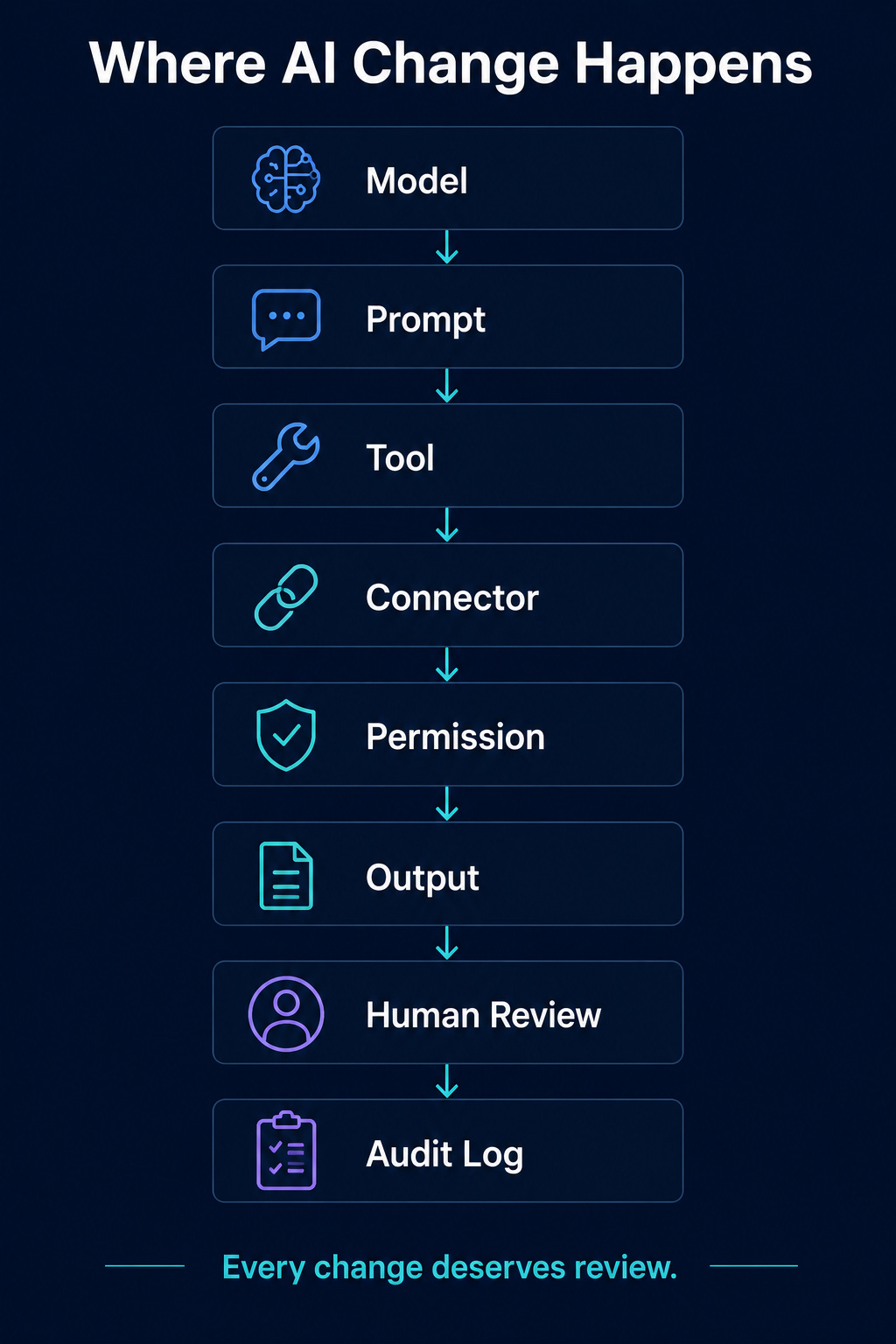
Create a repeatable change-control habit for AI-enabled recruiting workflows. Use it before any assistant, agent, automation, browser extension, Workspace feature, Copilot feature, or custom connector touches recruiting data.
Define the workflow, not just the tool. “Gemini” is not a workflow. “Generate a hiring-manager follow-up draft from approved intake notes” is a workflow. “Summarize one req folder for recruiter prep” is a workflow. “Create a weekly funnel insight packet from exported reports” is a workflow.
Document the minimum control set:
Owner: Who is accountable for the workflow?
Data sources: What can AI read, and what is blocked?
Actions: Can it summarize, draft, search, create, send, update, or export?
Tool inventory: Which connectors, extensions, plugins, and models are approved?
Metadata review: Who reviews changed tool descriptions or connector behavior?
Human approval: What requires review before use?
Logging: Are prompts, tool calls, sources, outputs, and corrections visible?
Artifact standard: Where does the output live, and what evidence travels with it?
Data posture: Are retention, legal hold, region, and deletion rules understood?
Change triggers: What forces re-review after launch?
The trigger list matters. Approval decays when the environment changes. Re-review the workflow when a connector changes, a tool description changes, a new data source is added, a model default changes, a browser extension updates permissions, an output destination changes, a budget cap changes, or a new user group gets access.
It sounds like overhead until you compare it with approving an AI workflow once and never reviewing it again
Start with blocked actions
Most teams make AI governance too abstract. Start with actions the system is not allowed to take.
Make the blocked list explicit:
no candidate ranking;
no rejection or advancement recommendations;
no protected-trait inference;
no compensation guidance;
no unsupervised candidate-facing messages;
no ATS or HRIS writes until read-only and draft-only workflows pass QA;
no broad Drive search when one folder is enough;
no third-party browser extensions unless IT has allowlisted them;
no AI retrieval for sensitive candidate matters if data region, retention, and auditability are unknown.
The safest workflows are usually administrative, evidence-based, and draft-only: intake cleanup, missing-information checklists, follow-up drafts, interview-plan QA, req-folder retrieval, source-grounded funnel notes, and recruiting ops reporting.
Run those first. Review the first 10 outputs manually. Track what the human corrected: missing evidence, wrong emphasis, invented fact, sensitive data, stale context, tone, policy risk, or not useful. Then expand what survives review.
Run the 60-minute review this week
Pick one AI-assisted recruiting workflow. Keep the scope narrow. Map the data sources, actions, tools, owner, reviewer, logs, output location, blocked actions, and re-review triggers. Remove every permission that is not needed for the first test.
Then run a small pilot:
Produce 10 AI outputs.
Require source links or source notes for every material claim.
Have a human reviewer mark each output accepted, edited, rejected, or blocked.
Log correction categories.
Decide expand, restrict, retrain, or stop.
That decision is the operating value. Adoption is not maturity. Usage is not quality. Access is not governance. AI can make recruiting work faster, more consistent, and easier to inspect. It can also make bad workflow design move faster through more systems.
Build the change-control habit now, while the first workflows are still small. Better models will keep arriving. Better workflow discipline won’t happen on its own.