

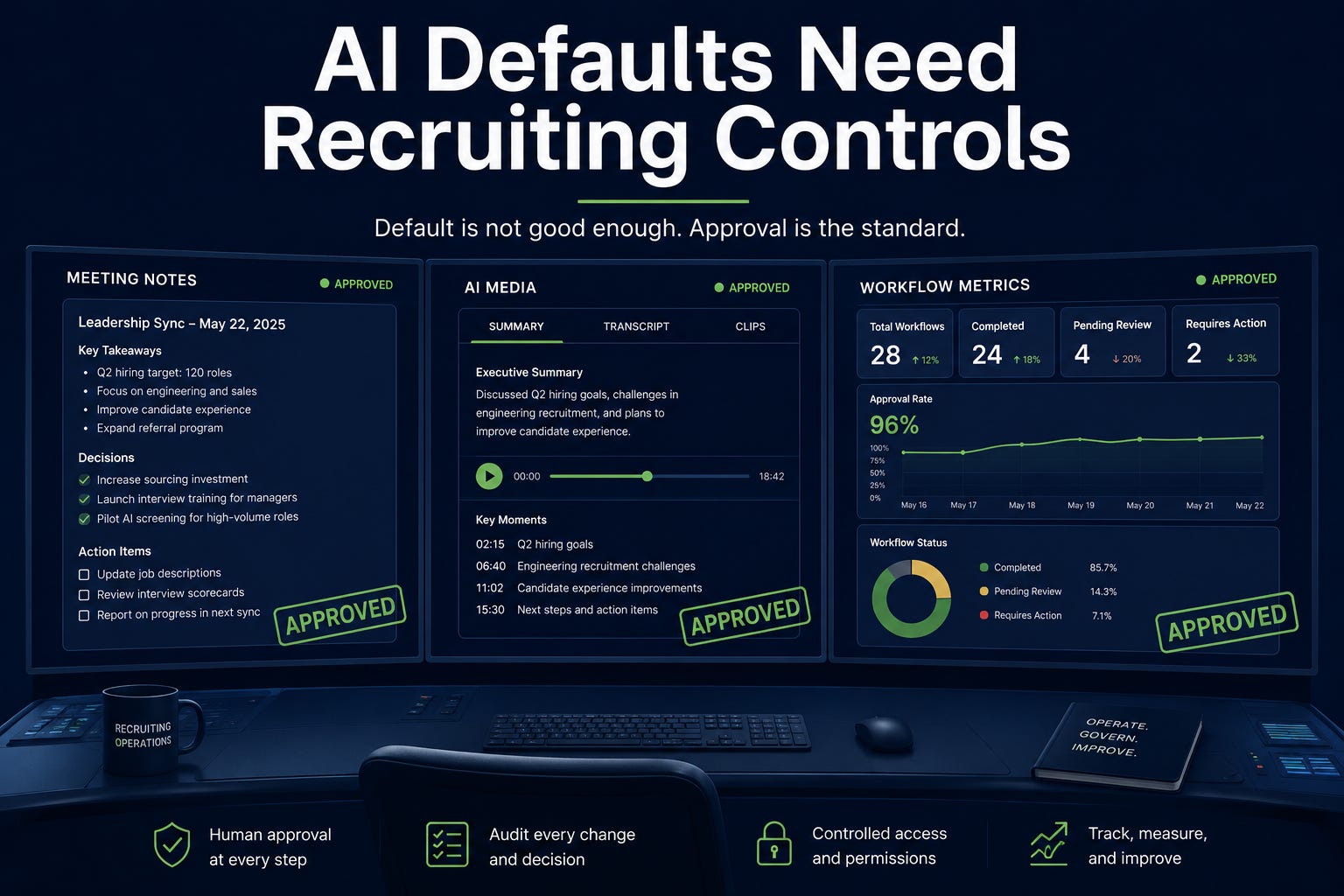
AI defaults are becoming recruiting controls. Many teams still treat them as IT settings. The operating question is: do you know when it turns on, what it touched, who reviewed it, what it cost, and whether it stayed inside its lane?
Meeting notes, avatars, generated video, multilingual docs, AI security detections, usage metrics, and agent architectures all point to the same thing: defaults create risk faster than policies create discipline.
2-Minute Skim
3 things to know
Google Meet is adding more automatic note-taking configuration, including a 3+ participant option that will be ON by default for some Business editions unless admins change it before September 21.
Hugging Face disclosed an AI-driven intrusion and said it used AI defensively to analyze more than 17,000 attacker events, while hosted-model safety filters initially blocked some forensic analysis.
GitHub expanded Copilot usage reporting and AI security detection surfaces, reinforcing that AI work needs workflow-level observability, not just seat counts.
2 things to test
Run a 45-minute audit of AI meeting-note settings for intake, debrief, calibration, employee-relations, and executive-search meetings.
Build a one-workflow AI evidence ledger that tracks output, source material, human reviewer, correction reason, time saved, and accepted outcome.
1 thing to ignore
AI avatar excitement for employer brand. Not until consent, review, and revocation controls are documented.
Executive Brief
AI defaults moved closer to recruiting workflows. Google Meet note-taking settings now require admin attention before they silently shape meeting capture behavior. Google Vids added AI video editing and personal avatars, including admin oversight for avatars but no admin control for Omni video editing. Gemini in Docs expanded multilingual generation and formatting support. GitHub made repository-level Copilot usage metrics generally available, added Copilot app usage metrics, surfaced AI security detections on pull requests, and tightened Copilot code review configuration with firewall defaults and custom instructions. Hugging Face disclosed an AI-driven security incident that exposed a practical defensive gap: hosted safety filters may block legitimate incident-response analysis.
Many teams will treat these as productivity features, but that is too shallow. In recruiting, auto notes can become evidence, avatars can misrepresent leaders, generated videos can distort employer brand, and agent outputs can influence decisions without a clean review trail.
Teams should move from “AI access” to “AI proof.” For every recruiting workflow, define default state, allowed data, blocked use, human reviewer, retention posture, source citation, correction log, cost owner, and accepted-outcome metric.
If you cannot prove what happened, do not scale it.
Patterns
AI defaults are becoming operating decisions. If admins do not set them intentionally, vendors will set the workflow posture for you.
AI proof is becoming more important than AI access. Usage by repo, app, workflow, task, and accepted outcome beats generic adoption reporting.
Media generation is entering normal business suites before most teams have likeness, brand, and review rules.
Security is now an AI-vs-AI operating problem. Defenders need AI-assisted analysis, but they also need models and tooling that work during incidents.
Strong agents are built from controls: deterministic tools, isolated sessions, versioned skills, source attribution, evals, and refusal boundaries.
What Matters This Week
1. Defaults Create Records Before Policy Catches Up
Google is rolling out a new admin option to enable automatic note-taking for meetings with three or more people, and Business Standard/Plus customers will see the setting ON by default unless changed before September 21.
Recruiting use case: Intake calls, candidate debriefs, calibration meetings, and employee-relations discussions need different note-taking rules.
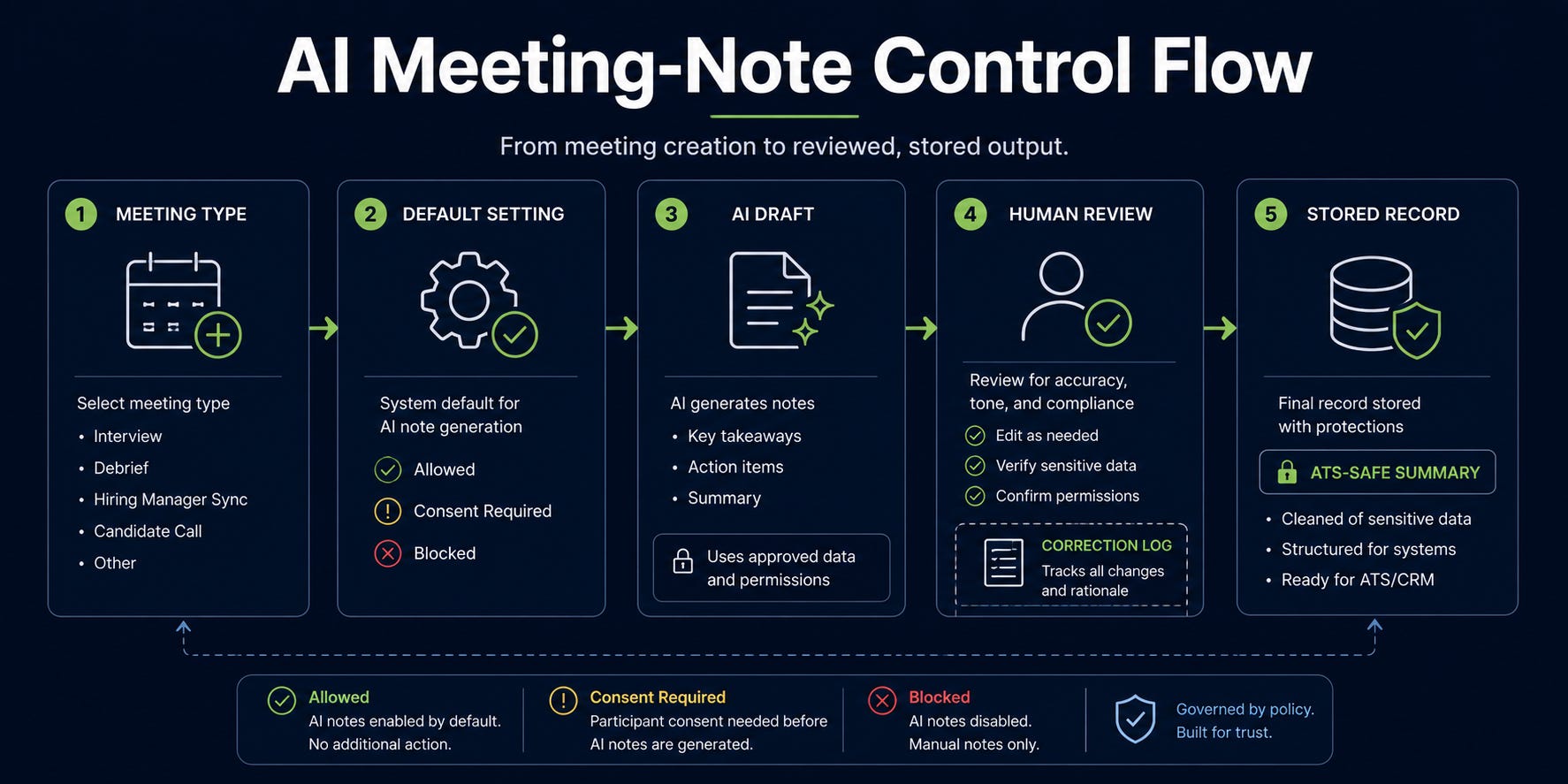
Decide where AI notes are allowed before the default decides for you. In recruiting, notes are not harmless productivity tools. They can become candidate evidence, hiring-manager context, compensation history, interview rationale, accommodation discussion, employee-relations material, agency-search strategy, or executive-search context. The next step is to audit meeting-note defaults before users build habits around them. For each recruiting meeting type, decide the capture state: allowed, allowed only with consent, manual only, or blocked. Then assign the owner, storage location, retention rule, review step, correction process, and allowed downstream use.
2. Security Is A Recruiting Ops Issue
Hugging Face disclosed an AI-driven intrusion that started in dataset processing, involved credential access and lateral movement, and was analyzed with AI over more than 17,000 attacker events. It also said hosted model guardrails initially blocked forensic analysis of exploit payloads.
Recruiting use case: Recruiting workflows can ingest untrusted material, including resumes, portfolios, LinkedIn profiles, agency submissions, emails, attachments, assessments, exported reports, scraped pages, and vendor data. Some of that material can be wrong. Some can be manipulative. Some can contain instructions an AI system should never follow.
Treat external candidate and web data as untrusted input, and ask security how AI-assisted incident response works when hosted tools refuse the content. The next security failure may be a malicious file or dataset your recruiting workflow processes.
3. OpenAI reframed AI spend around accepted outcomes.
OpenAI argued leaders should track useful work per dollar, govern advanced workflows before scale, fund repeatable workflows, and measure cost per accepted outcome rather than token price alone.
Recruiting use case: Measure AI on accepted candidate packets, corrected intake summaries, reviewed outreach drafts, or resolved coordinator handoffs instead of prompts sent.
If an AI workflow cannot define an accepted outcome, it is not ready for budget expansion. "More AI usage" is a lazy metric. Recruiting should buy outcomes, not activity.
4. GitHub repository-level Copilot metrics show an observability pattern.
GitHub’s repository-level Copilot metrics move reporting closer to where work happens. Instead of stopping at user or organization-level adoption, the API reports repository-level pull request activity for Copilot coding agent and Copilot code review.
Recruiting use case: TA AI should be measured by workflow: intake, sourcing, screening support, scheduling, debrief synthesis, offer prep, and reporting.
Stop reporting only user adoption; report workflow activity, accepted outputs, corrections, and downstream value. Seat utilization tells you who clicked. Workflow metrics tell you whether anything improved.
5. Shippy is a blueprint for high-stakes recruiting agents.
Ai2 described Shippy as a high-stakes maritime agent built with versioned skills, deterministic CLI tools, isolated user sessions, scoped credentials, source attribution, refusal boundaries, and evals against live data.
Recruiting use case: Use this architecture for candidate evidence assistants, intake QA agents, interview-plan builders, and hiring-manager briefing tools.
Do not build recruiting agents around raw API calls and vibes; wrap tools, isolate sessions, scope credentials, and evaluate behavior. The agent is not the model. The agent is the control system around the model.
6. Copilot code review improvements reinforce sandboxed AI work.
GitHub added configurable setup steps, independent runner settings, expanded custom instruction files, and firewall support enabled by default for Copilot code review.
Recruiting use case: Any recruiting agent that can use tools, fetch data, or access systems should have tool-specific setup, network restrictions, and testable instructions.
AI review and agent workflows need environment controls, not just prompt guidelines. A prompt boundary without a network boundary is ineffective.
7. Media Generation Needs A Likeness Gate
Google’s Vids updates make generated clips and personal avatars more accessible inside normal Workspace behavior. That can be useful. Recruiter enablement, internal training, event follow-up, and hiring-manager education all have reasonable low-risk use cases.
Recruiting use case: Employer-brand updates, recruiter enablement clips, event follow-ups, and hiring-manager training videos could be produced faster.
An AI avatar can represent an executive, recruiter, employee ambassador, hiring manager, or company voice. A translated or edited clip can introduce accessibility, localization, disclosure, or brand problems the recruiting team did not intend to create. Test behind four gates: legal review, likeness consent, accessibility review, brand approval.
AI avatars can create brand risk at scale if teams treat likeness as a Canva asset.
Step-by-Step Playbook: Build an AI Meeting Notes Control Standard
Use case
Use this for Google Meet, Zoom, Teams, Gong, Fireflies, Otter, Granola, Fathom, or any AI note-taker used in recruiting meetings.
Tools
Calendar and meeting platform admin settings
ATS and HRIS retention policy
Google Drive, Microsoft OneDrive, or note storage admin controls
Legal/compliance guidance
Recruiting operations owner
IT/security reviewer
Setup
List recurring recruiting meeting types: intake, debrief, calibration, panel prep, recruiter-hiring manager sync, coordinator handoff, offer review, employee-relations adjacent meetings, executive search, agency sync, and candidate calls.
Assign each meeting type a capture state: allowed, allowed with consent, manual only, or blocked.
Define who owns the notes: recruiter, coordinator, hiring manager, recruiting ops, or legal.
Define where notes can live and how long they are retained.
Define whether notes may be used in candidate evidence packets, hiring-manager summaries, or ATS updates.
Define correction rules: who reviews, how errors are fixed, and how disputed notes are handled.
Update admin settings before user defaults take effect.
Prompts
Use this prompt after a meeting transcript or AI note output is available and approved for review.
You are reviewing recruiting meeting notes for operational accuracy and compliance risk.

Meeting type: [intake / debrief / calibration / offer / sync]
Allowed use: [internal summary / ATS update / candidate packet / follow-up drafting]
Blocked use: no candidate ranking, no rejection recommendation, no protected-trait inference, no compensation advice unless explicitly discussed by authorized approvers.

Tasks:
1. Extract factual decisions only.
2. Separate evidence from opinions.
3. Flag statements that require human review before being stored or shared.
4. Identify missing owners or deadlines.
5. Produce a concise follow-up draft.

Output sections:
- Decisions
- Evidence cited
- Opinions or assumptions
- Risk flags
- Follow-up actions
- Items not safe to store without review
Workflow
Before rollout, audit current AI note defaults by meeting platform and user group.
Disable auto notes for sensitive meeting types unless legal has approved the capture standard.
Create naming conventions for approved notes:
REQID - Meeting Type - Date - Owner.Require human review before notes enter the ATS or candidate packet.
Sample 10 note outputs in the first two weeks and log corrections.
Review retention and sharing permissions monthly.
Common Mistakes
Treating AI notes as neutral records instead of model-generated drafts.
Allowing notes to enter ATS records without reviewer signoff.
Capturing candidate-sensitive discussions without consent or retention clarity.
Letting hiring-manager opinions become stored evidence.
Failing to correct hallucinated decisions, attendees, or action items.
When NOT To Use This
Do not use AI notes for candidate interviews unless consent, disclosure, retention, and accessibility rules are clear.
Do not use AI notes for employee-relations, accommodations, medical, legal, or sensitive compensation conversations without explicit legal approval.
Do not use AI notes when participants are discussing speculative concerns that should not become a stored record.
Expected Outcomes
Time saved: 10-20 minutes per intake or debrief summary.
Quality improvement: fewer missed action items and clearer owner tracking.
Risk reduction: fewer uncontrolled notes copied into ATS records, Slack, or shared docs.
Manager impact: better follow-up discipline without pretending the AI is the record of truth.
What Good Looks Like
Every captured meeting type has an owner, storage location, retention rule, and review step.
Notes are labeled as AI-generated drafts until reviewed.
Candidate-impacting summaries cite evidence and separate facts from opinions.
Sensitive meeting types are blocked or manual-only by default.
Corrections are logged and used to improve prompts and meeting practices.
Prompt Chain: Convert AI Meeting Notes Into Actionable Recruiting Follow-Up
Use case
Turn approved AI meeting notes into a clean recruiting follow-up without letting the model invent decisions, rank candidates, or store risky comments.
System Prompt
You are a recruiting operations analyst. You convert approved meeting notes into accurate, concise, human-reviewed follow-up materials.

Rules:
- Do not create candidate rankings or recommendations.
- Do not infer protected traits, motivations, compensation flexibility, health status, family status, age, race, gender, disability, immigration status, or other sensitive attributes.
- Separate facts, decisions, assumptions, and open questions.
- If evidence is missing, say so.
- Preserve accountability: every action needs an owner and deadline or a clear "owner needed" flag.
- Treat the transcript or notes as imperfect and flag contradictions.
User Prompt 1: Extract Decisions
Review these meeting notes.

Meeting type: [type]
Role/req: [role]
Notes:
[paste notes]

Extract only confirmed decisions. For each decision, include the supporting note text and the owner if stated. If no owner is stated, write "owner needed." Do not include opinions.
User Prompt 2: Separate Evidence From Opinion
Using the same notes, create two lists:
1. Evidence that can be used in a recruiting workflow.
2. Opinions, assumptions, or comments that require human review before storage.

For each item, explain why it belongs in that category in one sentence.
User Prompt 3: Draft Follow-Up
Draft a follow-up message for the meeting owner.

Requirements:
- 150 words max.
- Include decisions, actions, owners, and deadlines.
- Include open questions.
- Do not include sensitive comments or unverified assumptions.
- End with a clear confirmation request.
Outputs
Decision list
Evidence/opinion split
Risk flags
Follow-up message
ATS-safe summary, if allowed
How To Adapt
For intake: add must-have criteria, nice-to-have criteria, sourcing channels, and calibration examples.
For debrief: require evidence by competency and block candidate ranking unless a human entered the final decision.
For offer review: restrict output to approved compensation facts and open approvals.
For coordinator handoff: focus on owners, dates, dependencies, and candidate communication tasks.
When This Breaks
Notes are vague or contradictory.
The meeting included sensitive or legally privileged topics.
The AI note-taker misidentified speakers.
The team expects the model to decide what should go into the ATS.
There is no human owner for corrections.
Fast Wins
Review Google Meet AI note-taking defaults with IT before September 21 and document which recruiting meeting types should never auto-record notes.
Create a one-page AI meeting-note policy for recruiting: consent, retention, review owner, allowed meetings, blocked meetings, and correction process.
Build a simple AI output ledger for one workflow with columns for source, output, reviewer, correction, accepted outcome, and time saved.
Add “AI-generated media and likeness” to your employer brand approval checklist.
Ask security whether incident-response playbooks include an approved way to analyze malicious prompts, payloads, logs, and agent activity without leaking data to hosted tools.
Strategic Experiments
AI Notes With Evidence Separation
Hypothesis: AI notes save time only when the output separates decisions, evidence, opinions, and risks.
Test: Run the prompt chain on 10 intake or debrief meetings.
Measure: Minutes saved, corrections per note, missing owners, risky statements removed before storage.
Recruiting AI Outcome Ledger
Hypothesis: Cost per accepted outcome will expose which AI workflows deserve more funding.
Test: Track 25 outputs from one workflow: candidate packet drafts, intake summaries, or outreach rewrites.
Measure: Accepted outputs, correction rate, time saved, reviewer confidence, cost/tool usage if available.
Employer Brand AI Media Gate
Hypothesis: AI video and avatar tools are useful for internal enablement before external candidate-facing use.
Test: Create one internal recruiter training clip with full review and disclosure.
Measure: Production time, review cycles, brand/legal issues, accessibility issues, reuse rate.