

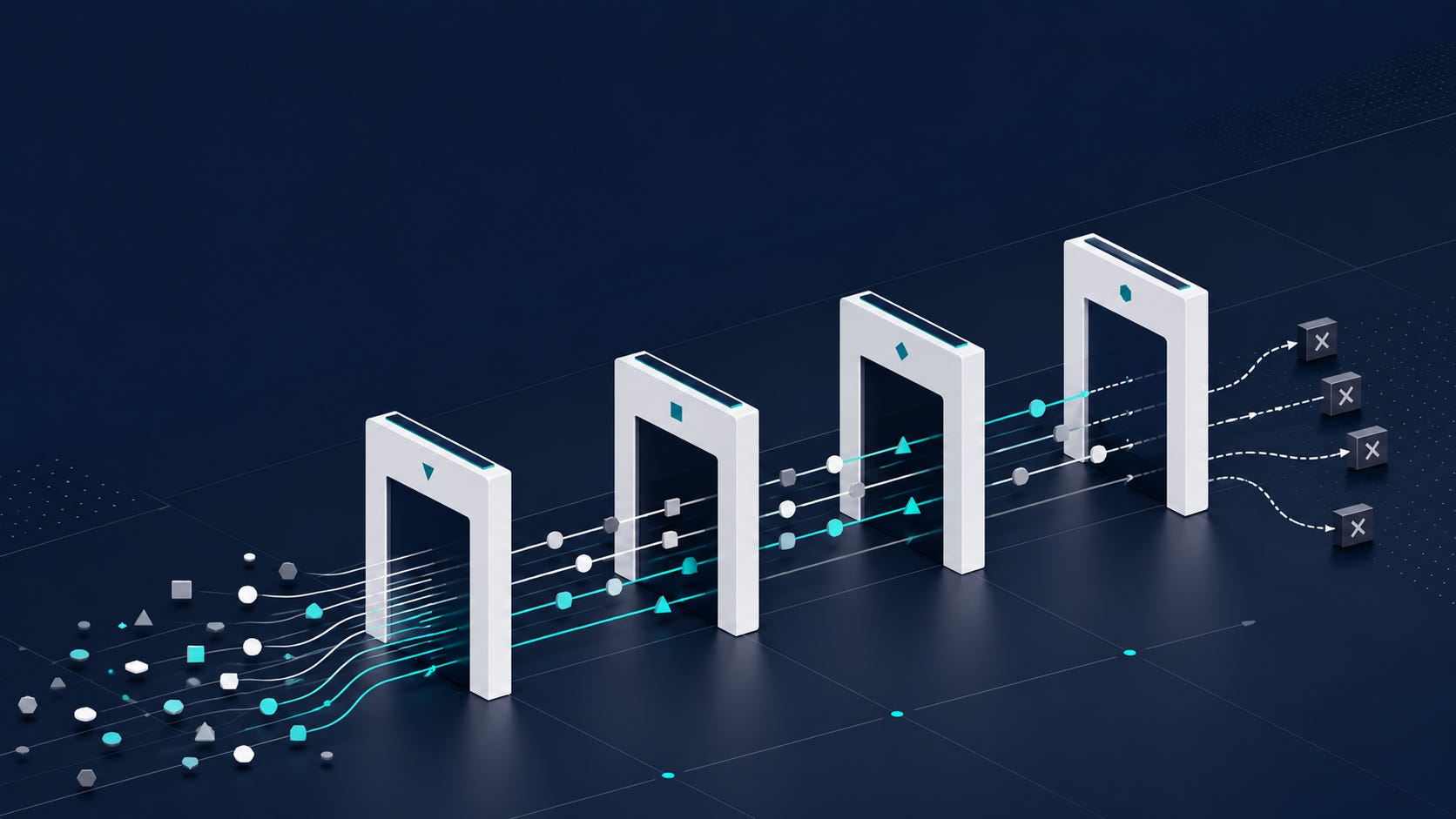
This was an agent-accountability week. AI is becoming capable of doing real work across recruiting systems, but many recruiting teams still haven't decided what AI is allowed to do. Models are stronger, routers are optimizing cost and quality, agents are getting approval panels, enterprise vendors are selling production deployment services, and meeting artifacts are becoming easier to find.
Better models reduce some task friction, but they increase the importance of workflow boundaries because mistakes can now move faster, cost more quietly, and look more polished. For recruiting teams, every production AI workflow now needs an owner, a cost boundary, an approval threshold, a source trail, and an escalation rule.
2-Minute Skim
3 things to know
OpenAI’s workplace research says 69% of HR workers’ occupation-specific ChatGPT use crosses into tasks associated with other occupations.
OpenAI Presence, GitHub agent automation controls, and Cursor Router all point to the same shift: production AI is moving from chat to governed task execution.
Google Meet will now organize notes, transcripts, and recordings into meeting-specific Drive folders, making meeting artifacts easier to find and easier to mishandle.
2 things to test
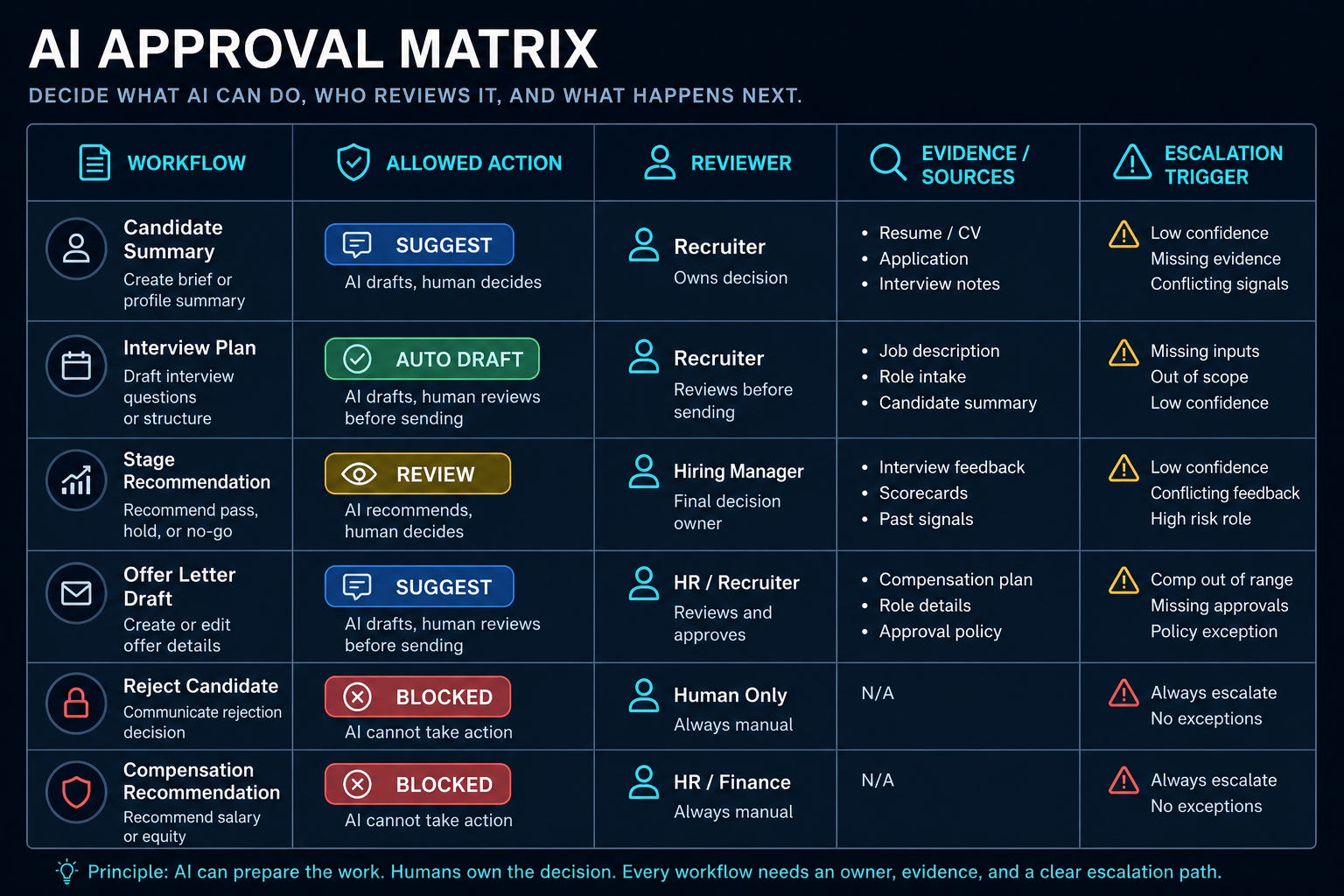
Build a recruiting AI approval matrix: what can apply automatically, what needs review, and what is blocked.
Create an AI cost and outcome ledger for one workflow: workflow, owner, tool, model/mode, spend, accepted output, correction reason, and time saved.
1 thing to ignore
Generic “best model” arguments. The question is which model, mode, or agent setting is allowed for which recruiting workflow at what risk and cost.
Executive Brief
OpenAI expanded into governed enterprise agents. GitHub added approval controls and AI operating metrics. Cursor turned model selection into an admin policy. Google Meet improved meeting artifact management. Anthropic continued pushing long-running agent workflows. These launches point to AI moving from chat into production work.
Many teams will treat stronger agents and model routing as a shortcut to autonomy. Instead, teams should define the operating contract for AI work. For every recruiting workflow, specify allowed actions, blocked actions, model or mode, source material, reviewer, confidence threshold, escalation path, cost owner, retention location, and accepted-outcome metric. If you can’t name the owner and the rollback path, don’t automate the workflow.
Patterns
AI work is moving from private chat to accountable workflows: approvals, rationale, dashboards, escalations, and cost centers.
Model choice is becoming an operating policy. Router modes, admin allow lists, model fallbacks, and usage-based billing make “which model” a governance decision.
Meeting artifacts are becoming easier to retrieve, which means retention, access, and correction rules matter more.
AI is expanding role boundaries, especially for HR, but that doesn’t mean every expanded task is ready for production.
Production agents need controls: scoped system access, policy tests, confidence thresholds, escalation rules, and post-launch improvement logs.
What Matters This Week
1. OpenAI’s workplace research says HR is already crossing role boundaries with AI.
OpenAI analyzed more than 800,000 U.S. ChatGPT messages and reported that 69% of occupation-specific messages from HR workers involved tasks associated with another occupation.
Recruiting use case: Recruiters can use AI to draft market maps, analyze funnel data, structure hiring-manager briefs, and produce operational documentation that used to require other specialists.
Train recruiters for adjacent task execution, but require review when outputs affect candidates, hiring decisions, compliance, or compensation. AI will not just make recruiters faster. It will expose which recruiters can operate across data, process, writing, and judgment.
2. GitHub’s agent controls show the right pattern for recruiting AI approvals.
GitHub Issues now supports agent suggestions with confidence, rationale, and optional approvals for labels, fields, type, close, and assignee changes.
Recruiting use case: Apply the same pattern to candidate summaries, disposition notes, stage-change recommendations, req prioritization, and hiring-manager follow-ups.
Separate low-risk formatting and routing from candidate-impacting actions that need human review. Confidence without rationale is just a number. Rationale without approval rules comes too late.
3. OpenAI Presence is the clearest sign that production agents are services, not prompts.
Recruiting use case: Candidate FAQ agents, employee-referral support, internal recruiting ops help desks, and hiring-manager service agents need the same operating scaffolding.
Don’t deploy recruiting agents unless the job, systems, permissions, escalation rule, and eval set are defined first. If your agent doesn’t know when to hand off, it’s not an agent. It’s an unattended risk.
4. Cursor Router makes model selection a policy decision.
Cursor Router sends requests to different models based on task and complexity, with Cost, Balance, and Intelligence modes plus admin controls for defaults and allow/block lists.
Recruiting use case: Reserve frontier models for judgment-heavy work. Route repetitive drafting to cheaper models with defined quality thresholds.
Create model/mode rules by workflow risk instead of letting users choose whatever feels best. Auto-routing can be useful, but only if finance, security, and quality agree on what “auto” is allowed to optimize.
5. Google Meet is making meeting records easier to find and easier to misuse.
Meet notes, transcripts, and recordings will automatically upload to a new Google Meet folder, organize into meeting-specific subfolders, and create attendee shortcuts to source files.
Recruiting use case: Intake calls, interview debriefs, calibration sessions, offer reviews, and executive-search meetings need clearer artifact access and retention rules.
Audit Drive permissions and recurring-meeting folders before sensitive recruiting conversations become searchable by default. Findability is not governance. It’s only useful after access, retention, correction, and deletion are controlled.
6. Claude Opus 5 raises the bar for long-running recruiting analysis.
Anthropic positions Opus 5 as stronger for long-running agents, coding, professional work, verification, and careful iteration.
Recruiting use case: Use stronger long-horizon models for structured market maps, interview-plan QA, source synthesis, and talent intelligence briefs.
Better reasoning expands analysis. It shouldn't expand authority.
7. GitHub’s impact dashboard and AI credit pools point to AI operating finance.
GitHub added Copilot adoption-phase dashboards and cost-center AI credit pools, moving AI management toward maturity, usage depth, throughput, and spend boundaries.
Recruiting use case: TA should track AI by workflow cohort, accepted outputs, correction rate, time saved, and spend by team or function.
Stop asking whether people use AI. Ask which workflows improved, who paid, and whether quality held. If AI spend is not tied to accepted outcomes, it will become another software bill disconnected from measurable recruiting outcomes.
Mistake Many Teams Will Make
They will let AI task crossover become role sprawl. Just because recruiters can do adjacent work doesn’t mean every recruiter should draft legal language, interpret compensation data, summarize medical accommodations, or change candidate status. Expanded capability needs expanded review discipline.
Step-by-Step Playbook: Build a Recruiting AI Approval Matrix
Use case
Use this before expanding AI from drafting into routing, summaries, status updates, candidate communications, screening support, interview planning, or hiring-manager follow-up.
Tools
ATS workflow list
Recruiting operations owner
Legal/compliance reviewer
IT/security partner
AI tool admin console
Spreadsheet or lightweight Airtable/Notion tracker
Sample outputs from one active recruiting workflow
Setup
List 10 recurring recruiting AI tasks: intake summary, job-post rewrite, sourcing search string, candidate summary, outreach draft, interview plan, debrief synthesis, follow-up email, stage-change recommendation, and funnel report.
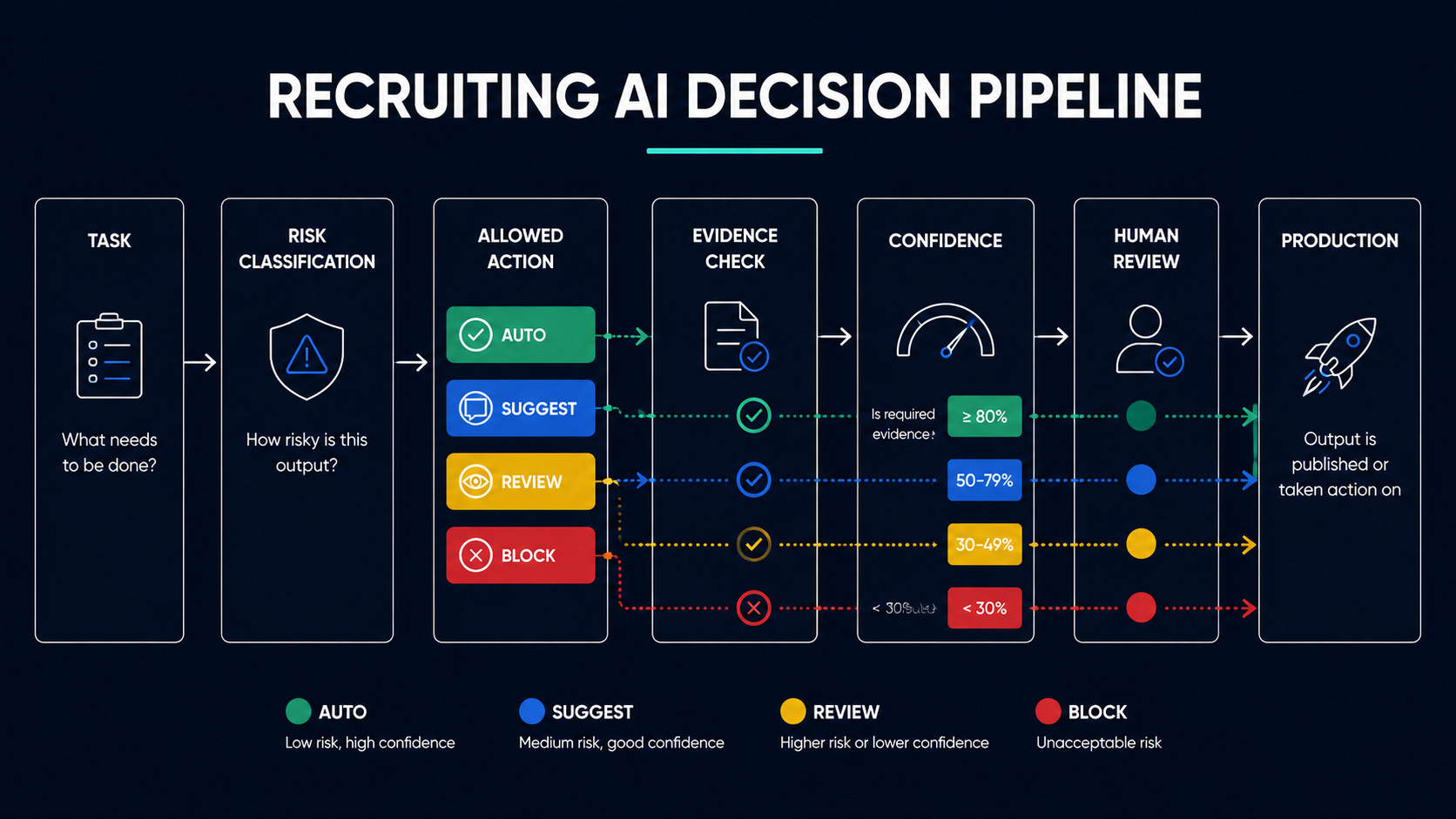
For each task, assign an action class: draft only, suggest-for-review, auto-apply, or blocked.
Add risk level: low, medium, high, or prohibited.
Define the required evidence: source docs, transcript, resume, ATS notes, scorecard, hiring-manager input, or market data.
Define review owner: recruiter, recruiting manager, coordinator, hiring manager, legal, or comp.
Set confidence handling: high can proceed, medium needs review, low is blocked or returned for clarification.
Define escalation triggers: missing source, conflicting evidence, protected-trait inference, compensation recommendation, candidate rejection, legal/compliance flag, or unclear owner.
Add cost controls: approved tool, model/mode, monthly cap, and who owns spend.
Pilot on one workflow for one week and log accepted outputs, corrections, policy flags, and time saved.
Workflow
Start with a low-risk workflow like hiring-manager follow-up drafts after intake.
Create 15 sample cases: clean input, missing input, biased input, conflicting input, sensitive info, and unclear next step.
Run the AI workflow and classify each output against your matrix.
Require the model to provide source references and rationale.
Review all medium/high-risk outputs manually.
Record correction reasons in a simple ledger.
After one week, decide whether to adopt, adjust, or stop.
Prompt
You are supporting a recruiting workflow. Follow the approval matrix below.

Workflow: [workflow name]
Allowed action: [draft only / suggest-for-review / auto-apply / blocked]
Required sources: [list]
Blocked actions: [list]
Reviewer: [role]
Escalation triggers: [list]

Source material:
[paste approved source material]

Task:
[specific task]

Return:
1. Draft output
2. Source references used
3. Rationale for each substantive claim
4. Confidence: high / medium / low
5. Required human review: yes / no
6. Any escalation trigger detected
Common mistakes
Treating approvals as security controls. They are workflow controls unless enforced by permissions.
Allowing AI to recommend rejection, ranking, compensation, or stage movement without human ownership.
Measuring prompts sent instead of accepted outputs.
Forgetting recurring meetings and shared Drive folders in the evidence trail.
Letting users select high-cost models without workflow-level rules.
When NOT to use this
Do not use for final hiring decisions, adverse-action notices, legal conclusions, medical/accommodation interpretation, compensation recommendations, or unsupervised candidate messaging.
Do not use when source material is incomplete or permissions are unclear.
Do not use when no one owns correction and rollback.
Expected outcomes
20-40% faster drafting on low-risk recruiting ops tasks.
Fewer unsourced candidate summaries.
Clearer accountability for AI-generated notes and follow-ups.
Lower model spend by reserving expensive models for high-value analysis.
What good looks like
Every AI output has a source, rationale, reviewer, action class, and correction status.
Blocked actions are documented and enforced.
Managers can see which workflows save time and which create rework.
Recruiters know when to use AI, when to review it, and when to stop.
Prompt Chain: Candidate Brief With Rationale and Review Gate
Use case
Create a hiring-manager candidate brief from approved source material without letting AI rank, reject, or infer protected traits.
System prompt
You are a recruiting operations assistant. Your job is to create evidence-based candidate briefs from approved source material. You must not rank candidates, recommend rejection, infer protected traits, evaluate culture fit, make compensation recommendations, or invent missing facts. Every substantive claim must cite the source section used. If evidence is missing or conflicting, flag it for human review.
User prompt 1: Evidence extraction
Extract only evidence relevant to this role.

Role requirements:
[paste requirements]

Approved source material:
[resume, recruiter screen notes, portfolio notes, scorecard excerpts]

Return a table with: requirement, evidence, source reference, strength of evidence, missing evidence, and review flag.
User prompt 2: Brief draft
Using only the evidence table, draft a concise candidate brief for a hiring manager.

Format:
- Candidate snapshot
- Evidence aligned to role requirements
- Open questions for interview
- Risks or gaps to verify
- Do not include ranking, recommendation, protected-trait inference, or compensation guidance.
User prompt 3: Review gate
Audit the brief before it is shared.

Check for:
- Unsupported claims
- Ranking or recommendation language
- Protected-trait inference
- Culture-fit language
- Compensation assumptions
- Missing source references
- Claims that should be softened or removed

Return: approved / needs revision / blocked, with rationale.
Outputs
Evidence table
Hiring-manager brief
Review gate result
Correction log
How to adapt
For executive search, add market evidence and confidentiality constraints.
For internal mobility, add current role context and manager-approved data boundaries.
For high-volume hiring, shorten the brief but keep the review gate.
When this breaks
Source material is incomplete or biased.
Interview notes contain protected-trait references.
Hiring managers ask for ranking or “fit” judgments.
The model fills gaps instead of flagging missing evidence.
Fast Wins
Create a three-column AI action policy for recruiting: auto-apply, suggest-for-review, blocked.
Audit where Meet notes, transcripts, and recordings now land in Drive and who can access recurring interview/debrief folders.
Pick one AI workflow and add a cost owner plus a monthly spend ceiling.
Add “rationale required” to AI-generated candidate summaries, slate notes, and hiring-manager follow-up drafts.
Ask IT whether model routers or auto modes are enabled by default in developer or productivity tools.
Strategic Experiments
AI Approval Matrix Pilot
Hypothesis: Recruiting teams can safely speed up low-risk workflows by classifying AI actions before deployment.
Test: Apply the approval matrix to hiring-manager follow-up drafts for one week.
Measure: Time saved, correction rate, review time, policy flags, and manager satisfaction.
Recruiter Task Crossover Enablement
Hypothesis: Recruiters can take on more adjacent analytical work if trained with templates, review gates, and source standards.
Test: Train one recruiter cohort on market-map synthesis and funnel-analysis briefs.
Measure: Output acceptance rate, manager revisions, time saved, and analyst/escalation requests avoided.
Meeting Artifact Control Audit
Hypothesis: AI meeting artifacts are already spreading faster than governance.
Test: Audit 10 recent recruiting meetings for artifact location, access, retention, and sensitivity.
Measure: Incorrect access, missing owner, retention mismatch, and notes requiring correction.
The Decision Rule
Use this rule for the next AI recruiting workflow someone wants to scale:
If an AI output could influence candidate communication, stage movement, ranking, rejection, compensation, interview evidence, hiring-manager recommendations, or access to recruiting data, require an approval rule before expansion.
That approval rule does not need to be complicated. It can live in Sheets, Airtable, Notion, Jira, ServiceNow, or a GRC system.
But it needs to exist.
AI is expanding what recruiters can do. Agents are becoming easier to deploy. Routers are choosing models. Meeting artifacts are becoming easier to retrieve. Dashboards are making AI usage and spend more visible. Models like Claude Opus 5 will keep raising the ceiling on long-running analysis.
None of that changes the recruiting operations problem.
The question is not whether AI can do more.
The question is whether your team has decided what AI is allowed to do next.