

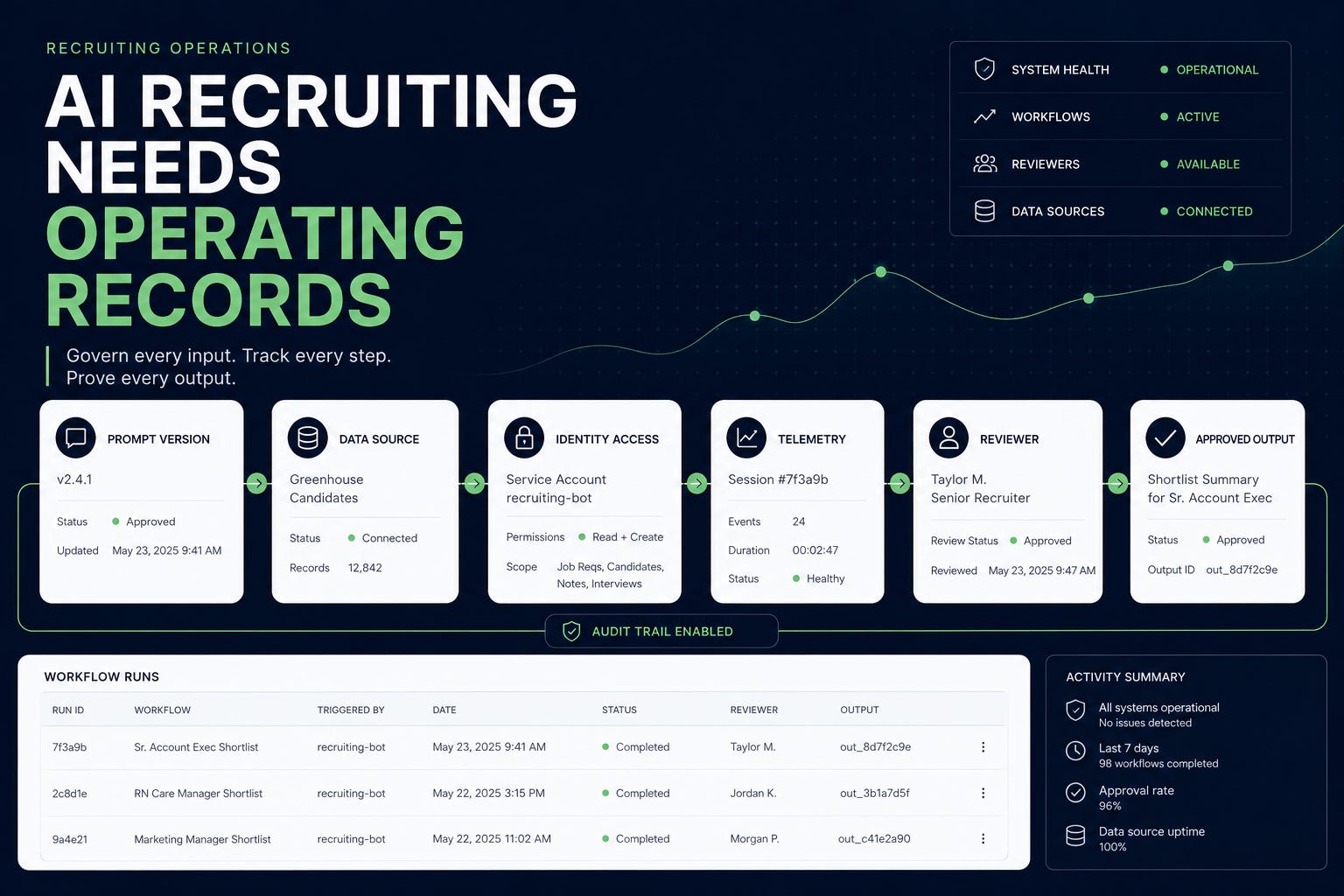
Prompts and skills are getting systems of record. AI telemetry is moving into approved collectors. Identity lifecycle controls are reaching AI-connected workspaces. Prompt-injection detection is becoming a normal security-review concern.
It was an operations week. That matters because many recruiting teams are still treating AI as individual productivity software. A recruiter finds a useful prompt. A coordinator copies it into a private chat. A sourcer adds a connector. A leader asks for a candidate summary. Someone saves a better version in a personal doc. The workflow gets faster, but the record disappears.
If your team cannot say which prompt, skill, connector, permission, and data source produced an AI-assisted recruiting output, you are not ready to scale. The next maturity step is not more agents. It is an operating record.
2-Minute Skim
3 things to know
Mistral launched versioned, owned, auditable prompts and skills in Studio. This is the right operating model for recruiting AI instructions.
Google Workspace added inbound SCIM, making HRIS/IdP-driven provisioning and deprovisioning more directly tied to Workspace and downstream tools like Gemini Enterprise.
GitHub added managed OpenTelemetry export, MDM-delivered Copilot settings, and CodeQL prompt-injection detection. AI governance is moving from policy language into enforceable infrastructure.
2 things to test
Create a prompt-and-skill registry for one recruiting workflow: owner, version, purpose, data touched, output reviewed, and rollback path.
Run a 45-minute access lifecycle check: pick three recruiter role changes or departures and verify whether Workspace, AI tools, shared drives, calendars, and candidate-data access changed correctly.
1 thing to ignore
The model menu arms race. GPT-5.6 in Copilot and Kimi availability matter less than whether your AI workflows have owners, telemetry, permission boundaries, and review logs.
Executive Brief
AI governance is becoming more concrete. Mistral framed prompts and skills as production assets with immutable versions, ownership, rollback, labels, audit logs, lineage, and telemetry. Google Workspace made inbound SCIM generally available, tying identity lifecycle changes from an IdP, HRIS, or custom app to Workspace accounts and downstream apps. GitHub expanded enterprise Copilot controls through managed OpenTelemetry export, MDM settings delivery, per-user budgets, usage adoption fields, and CodeQL prompt-injection detection. Google also expanded Gemini in Sheets and tightened Calendar delegation privacy.
Many recruiting teams will keep treating prompts as disposable text and AI usage as individual productivity. That fails in recruiting. Recruiting AI instructions encode tone, policy, data-handling rules, candidate communication standards, and decision boundaries. If those instructions live in Slack, personal docs, copied prompt libraries, or unowned workflow automations, you cannot audit or improve them.
Recruiting teams should build an AI operating record for every recruiting workflow. Track the prompt, skill, model/tool, data source, permission scope, owner, approved use, blocked use, reviewer, output location, correction log, and last review date. If the workflow cannot be traced, do not let it influence candidate communication, stage movement, ranking, rejection, compensation, or hiring-manager recommendations. One rule for the next AI workflow someone wants to scale:
If the output could influence candidate communication, stage movement, ranking, rejection, compensation, hiring-manager recommendations, interview evidence, or access to recruiting data, require an operating record before expansion.
Patterns
AI governance is becoming infrastructure. The best releases this week were not chat features; they were versioning, telemetry, MDM settings, lifecycle provisioning, budget state, and static-analysis controls.
Prompts are becoming production assets. If a prompt defines policy, tone, data handling, or candidate communication behavior, it needs ownership, versioning, testing, and rollback.
Identity lifecycle is now AI lifecycle. When a recruiter changes role or leaves, AI-connected access to Drive, Gemini, shared calendars, candidate folders, and workflow automations must change immediately.
Spreadsheet AI is moving from novelty to daily ops. Gemini in Sheets is practical for classification and cleanup, but risky if teams use it for judgment or candidate evaluation.
Usage analytics are shifting from consumption to adoption quality. Review cycles, time to adoption, telemetry, and per-user budget state are more useful than raw seat utilization.
What Matters This Week
1. Prompts Are Operating Policy
Mistral made the clearest case this week with its Studio update: prompts and skills are now treated as versioned, owned, traceable production assets with immutable versions, rollback, labels, audit logs, lineage, and telemetry.
Recruiting use case: Use the pattern for intake prompts, candidate-packet prompts, outreach-review prompts, interview-plan QA prompts, and recruiting analytics skills.
Stop managing recruiting prompts in personal docs, Slack threads, and copied snippets. A prompt that shapes candidate communication is not a prompt. It is operating policy with syntax.
2. Identity Lifecycle Is AI Lifecycle.
Google Workspace added inbound SCIM support, which lets Workspace sync directory changes in real time from an identity provider, HRIS, or custom app. Google specifically notes provisioning, updates, deactivation, synced groups, and downstream access such as Gemini Enterprise. For recruiting operations, this lands as an access-control issue.
Recruiting use case: Recruiter transfers, agency offboarding, coordinator rotations, and contractor exits should automatically change access to candidate folders, shared calendars, AI tools, and Gemini-connected data.
AI governance starts with identity hygiene. If a departed sourcer can still access AI-searchable candidate files, your AI strategy is a leak path.
3. Auditability Cannot Depend On Memory.
GitHub also pushed the governance pattern forward. Its enterprise-managed OpenTelemetry export for Copilot lets organizations mandate where telemetry goes, including controls for whether prompt, response, and tool content is captured. Its managed settings update lets admins deliver Copilot controls through MDM, file-based configuration, or server-managed settings. This is a developer-tool release , but the recruiting implication is broader.
Recruiting use case: Sensitive TA AI workflows need the same pattern: approved log destination, session metadata, tool calls, reviewer actions, and output disposition.
If you cannot observe AI work, do not let it touch candidate data. AI auditability cannot depend on users remembering to export chat history.
4. Treat Source Text As Untrusted Input.
CodeQL added a JavaScript/TypeScript query that detects untrusted user-provided values flowing into AI system prompts, plus additional prompt-injection sinks for OpenAI, Anthropic, and Google GenAI SDK APIs.
Recruiting use case: Any custom recruiting assistant that places resume text, candidate notes, job descriptions, emails, or external web content into instructions needs prompt-injection testing.
Treat candidate and web text as untrusted input, not harmless context. Any custom recruiting assistant should separate system instructions from source material, cite the evidence it used, flag missing information, and refuse candidate ranking, rejection, stage movement, protected-trait inference, or unsupervised external messaging unless the workflow has explicit approval.
Step-by-Step Playbook: Build a Recruiting AI Operating Record
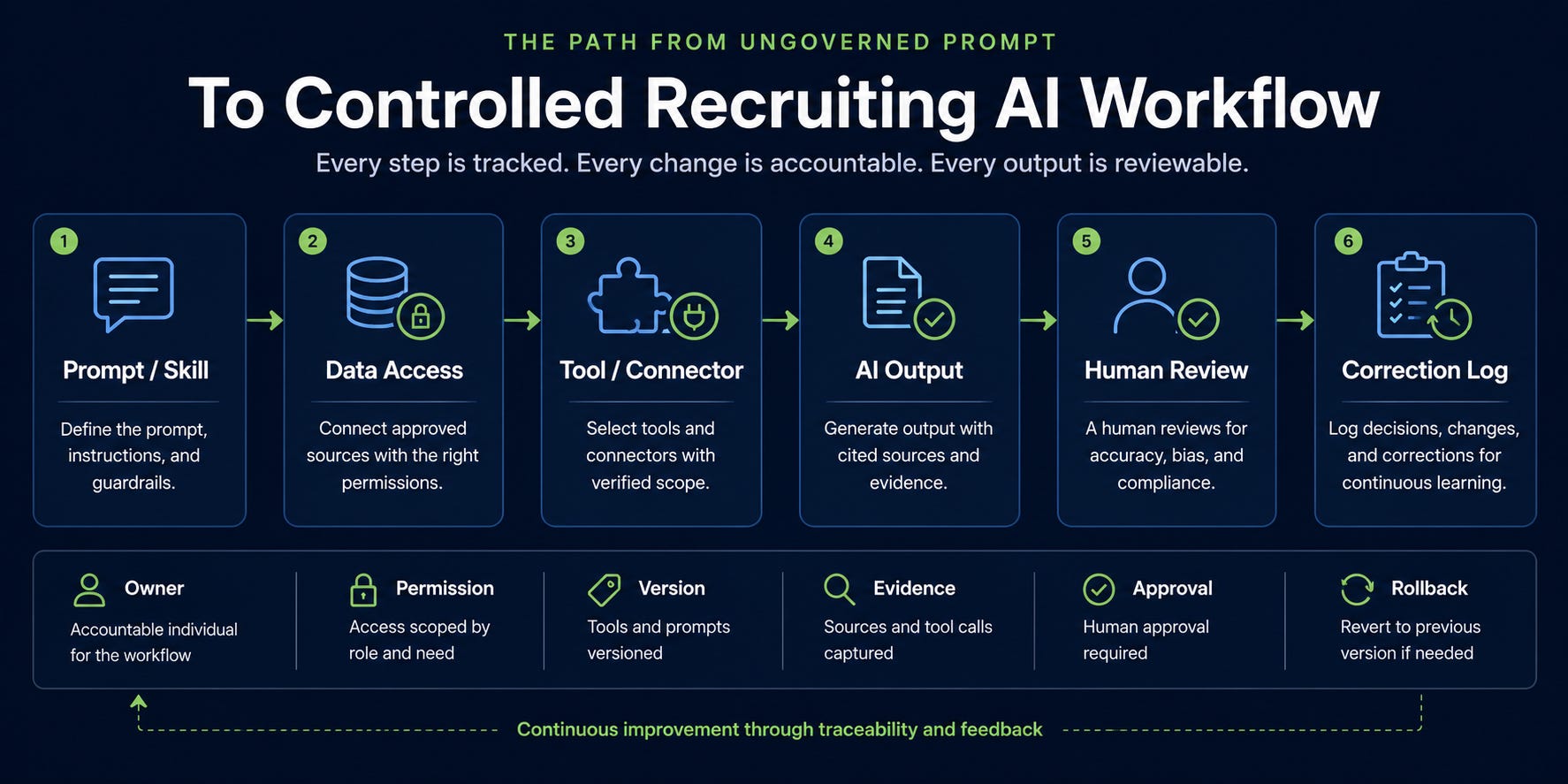
Start with one workflow, not the whole recruiting function. Pick something low risk: intake-note cleanup, interview-plan QA, requisition-folder summarization, source-channel normalization, event follow-up cleanup, or candidate-packet formatting without scoring. Then create the operating record before rollout:
Workflow name and business purpose
Owner and human reviewer
Risk level: read-only, draft-only, internal action, external message, system write, or decision influence
Prompt or skill name, version, storage location, approved users, and rollback version
Allowed and blocked data sources
Allowed and blocked actions
Connected tools, connectors, plugins, and permission scope
Identity/access source and deprovisioning path
Output type, output storage location, required citations, and approval rule
Correction log location, known failure modes, test examples, and next review date
Run five known examples through the workflow. Mark every correction: wrong source, missing context, overreach, hallucination, bias risk, tone issue, policy issue, or privacy issue. Update the prompt only after reviewing the corrections. This is slower than copying a prompt into a shared folder. It is also the difference between a prompt library and an operating system.
Use case
Use this for any AI workflow that touches recruiting data, hiring-manager context, candidate communication, candidate evidence, interview plans, sourcing lists, spreadsheet cleanup, or recruiting analytics.
Tools
Airtable, Notion, Sheets, Jira, ServiceNow, or your GRC system
Workspace/Microsoft/Slack/ATS admin consoles
AI tool admin logs, telemetry exports, or session history where available
HRIS/IdP/SCIM access records
A recruiting ops owner and an IT/security reviewer
Setup
Pick one workflow, not the whole function.
Name the workflow owner and human reviewer.
Identify whether the workflow is read-only, draft-only, internal action, external message, system write, or decision influence.
List every data source the AI can touch.
List every prompt, skill, connector, automation, plugin, and model/tool involved.
Define blocked actions before testing.
Create a correction log before rollout.
Operating Record Template
Workflow name:
Business purpose:
Owner:
Reviewer:
Risk level: Read-only / Draft-only / Internal action / External message / System write / Decision influence

Prompt or skill name:
Version:
Storage location:
Approved users:
Last reviewed:
Rollback version:

Allowed data sources:
Blocked data sources:
Allowed actions:
Blocked actions:

Connected tools/connectors/plugins:
Permission scope:
Identity/access source:
Deprovisioning path:

Output type:
Output storage location:
Required citations/evidence:
Human approval required before:
Correction log location:

Known failure modes:
Test examples:
Policy flags:
Next review date:
Workflow
Start with a low-risk workflow such as intake-note cleanup, interview-plan QA, requisition folder summarization, or source-channel normalization.
Register the prompt or skill before use.
Run five known examples through the workflow.
Mark every correction: wrong source, missing context, overreach, hallucination, bias risk, tone issue, policy issue, or privacy issue.
Update the prompt version only after reviewing corrections.
Store the approved output with evidence or source references.
Review access monthly and after every role change, vendor change, or tool update.
Prompts
You are assisting a recruiting operations team. Use only the provided source material. Do not infer candidate quality, protected traits, compensation fit, or hiring recommendation. Produce a structured operational output with cited evidence, missing information, and review flags.

Workflow: [workflow]
Allowed output: [output type]
Blocked actions: [blocked actions]
Source material: [paste or attach approved material]

Return:
1. Cleaned/structured output
2. Source evidence used
3. Missing information
4. Items requiring human review
5. Confidence level and reason
Review this AI output as a recruiting ops reviewer.

Check for:
- unsupported claims
- candidate evaluation or ranking
- protected-trait inference
- compensation or legal overreach
- missing citations
- stale or conflicting source data
- tone issues for candidate-facing content

Return:
1. Approve / revise / reject
2. Required edits
3. Risk flags
4. Correction category
5. Prompt change recommendation
Common Mistakes
Starting with candidate ranking or screening instead of ops cleanup.
Letting recruiters copy unversioned prompts into private chats.
Skipping correction logs because the output “looks good.”
Treating source text from resumes, emails, job boards, and websites as trusted instructions.
Forgetting offboarding and role-change access when AI can search shared drives or mailboxes.
When NOT To Use This
Do not use it for automated rejection, ranking, stage movement, compensation advice, protected-trait inference, or unsupervised candidate messaging.
Do not use it when the source material is incomplete and the output would be treated as decision evidence.
Do not use it if you cannot store the prompt, output, and correction record in an approved location.
Expected Outcomes
20-40% faster cleanup and QA on low-risk recruiting ops workflows.
Lower rework because corrections feed prompt updates.
Better audit readiness because each output has owner, version, source, and reviewer context.
Fewer “mystery AI” outputs floating through hiring processes.
What Good Looks Like
Every recruiting AI workflow has a named owner.
Every production prompt or skill has a version, approved use, blocked use, and rollback path.
Every sensitive output has cited evidence and a human reviewer.
Every failure becomes a correction record, not a private complaint.
Access changes follow HRIS/IdP lifecycle events, not manual memory.
Prompt Chain: Candidate Packet QA Without Candidate Scoring
Use case
Turn messy intake notes, job requirements, interview feedback snippets, and recruiter notes into a clean evidence packet without ranking or recommending the candidate.
System Prompt
You are a recruiting evidence-packet assistant. Your job is to organize source material, not evaluate people. You must not rank, score, reject, recommend, infer protected traits, infer compensation expectations, or make hiring decisions. Use only provided material. Cite source snippets. Flag missing or conflicting evidence. Keep outputs factual, concise, and review-ready.
User Prompt 1: Structure Evidence
Create a candidate evidence packet from the source material below.

Role:
[role]

Decision criteria:
[criteria]

Source material:
[paste approved notes]

Return:
1. Role criteria map
2. Evidence present, with source snippets
3. Evidence missing
4. Conflicts or ambiguity
5. Questions for recruiter/hiring manager
6. Review flags
User Prompt 2: QA the Packet
Audit this packet for unsupported claims, hidden evaluation language, protected-trait risk, missing citations, stale information, and tone issues.

Return:
1. Pass/fail by category
2. Required edits
3. Claims to remove
4. Questions to resolve before use
User Prompt 3: Convert to Hiring-Manager Brief
Rewrite the approved packet into a hiring-manager brief.

Rules:
- No recommendation
- No score
- No ranking
- No protected-trait inference
- Include evidence and gaps
- End with decisions the human must make
Outputs
Structured evidence packet
QA report
Hiring-manager brief
Correction log entries
How To Adapt
For executive search: add source confidence and relationship context.
For high-volume roles: add structured tags for required qualifications and missing evidence.
For interview loops: add interviewer/source attribution and conflict flags.
When This Breaks
Source notes are too thin or biased.
Hiring criteria are vague.
Recruiters ask the model to “recommend” or “rank.”
The model is allowed to pull in external data without provenance.
Reviewers skip the QA step.
Tool / Capability Radar
Adopt:
prompt/skill systems of record, AI operating records, telemetry exports, enforced settings, SCIM-driven access changes.
Test:
Gemini in Sheets for non-sensitive ops cleanup, Calendar delegation permissions for recruiting leaders, Claude reflection for individual AI usage hygiene.
Watch:
Per-user AI budgets, adoption-phase usage APIs, mobile agent session management, AI prompt-injection static analysis expansion.
Fast Wins
Register one production recruiting prompt with owner, version, approved use, blocked use, and last review date.
Ask IT for the AI-access offboarding path for recruiters, sourcers, coordinators, agencies, and contractors.
Sample 20 Gemini-in-Sheets outputs before using any classification at scale.
Add “no candidate ranking/rejection/stage movement” to every recruiting AI prompt.
Review calendar delegation for leaders handling confidential searches.
Strategic Experiments
Prompt Registry Pilot
Hypothesis: Versioned prompts reduce rework and policy drift in recurring recruiting workflows.
Test: Register three prompts for intake cleanup, candidate packet QA, and hiring-manager updates.
What to measure: correction rate, approval time, reviewer confidence, repeated errors, prompt changes.
AI Access Lifecycle Audit
Hypothesis: Recruiting AI risk is concentrated in stale access after role changes and vendor offboarding.
Test: Audit five recent role changes/departures across Workspace, shared drives, ATS exports, calendars, AI tools, and groups.
What to measure: stale access found, time to revoke, systems missed, ownership gaps.
Spreadsheet AI Cleanup Trial
Hypothesis: Gemini in Sheets can reduce recruiting ops cleanup time without affecting candidate judgment.
Test: Use it on a non-sensitive event follow-up or source-channel cleanup sheet.
What to measure: time saved, error rate, categories corrected, reviewer effort, output reuse.