

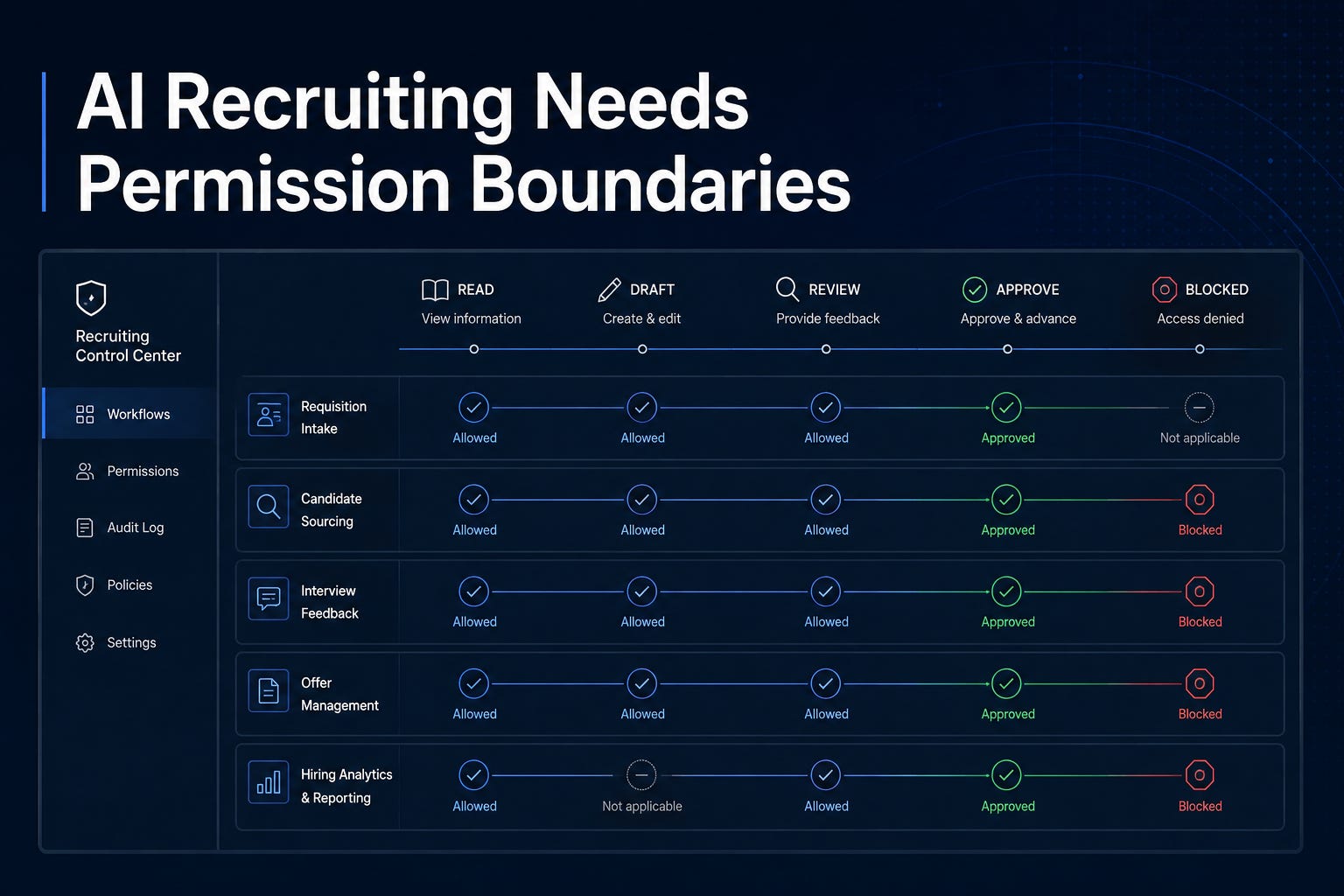
AI recruiting needs narrower permission boundaries. Recruiting teams already work inside docs, meetings, email, calendars, shared drives, browser tools, code-like automations, analytics surfaces, and systems connected to candidate data. When AI gets deeper access to those surfaces, the question is what it is allowed to do.
2-Minute Skim
3 things to know
2 things to test
Build a recruiting AI permission map: who can use which model, in which tool, for which workflow, with what data, and under what review rule.
Audit AI meeting notes for visual capture: decide whether interview, intake, debrief, calibration, offer, and executive-search meetings may include screenshots.
1 thing to ignore
“Agents will figure it out” optimism. The strongest evidence this week says agents need narrower execution surfaces, not broader trust.
Executive Brief
AI vendors and platforms pushed more controls into the enterprise layer. GitHub added organization-level model policy targeting for Copilot Enterprise and expanded managed settings to the Copilot app and cloud agent. Google Meet is preparing visual screenshots in AI meeting notes. Gemini can now summarize, reply to, comment on, and suggest edits from Google Docs comment threads. GitHub Actions now holds certain suspicious workflows for approval before execution. The new hold applies to certain potentially malicious workflow runs in public GitHub repositories.
Many teams treat governance as an IT admin setting. The recruiting risk is whether the AI can see sensitive candidate data, infer protected information, summarize evidence incorrectly, capture visual meeting context, draft candidate-impacting language, or move work across systems without a clear owner.
Teams should build a permission boundary for recruiting AI. Define allowed models by role, approved tools by workflow, source systems by sensitivity, meeting artifact rules by meeting type, review gates by candidate impact, and blocked actions by legal or trust risk. If AI can read, write, send, score, summarize, screenshot, route, or recommend, it needs an explicit permission rule.
Permission Is Not Tool Access
Many teams still govern AI by tool name. Gemini is allowed. Copilot is allowed. ChatGPT is allowed. Meeting notes are allowed. Browser automation is allowed for a pilot group. That’s too shallow.
A tool can contain many different actions. Reading a job description is not the same as editing it. Summarizing intake notes is not the same as generating an interview plan. Drafting a candidate email is not the same as sending it. Capturing a meeting transcript is not the same as capturing screenshots of presented compensation, calibration, or executive-search material.
Permission has to move from tool access to action authority. Use this distinction:
Access answers: Can this person use the AI tool?
Authority answers: What may the AI read, write, infer, store, route, recommend, or execute?
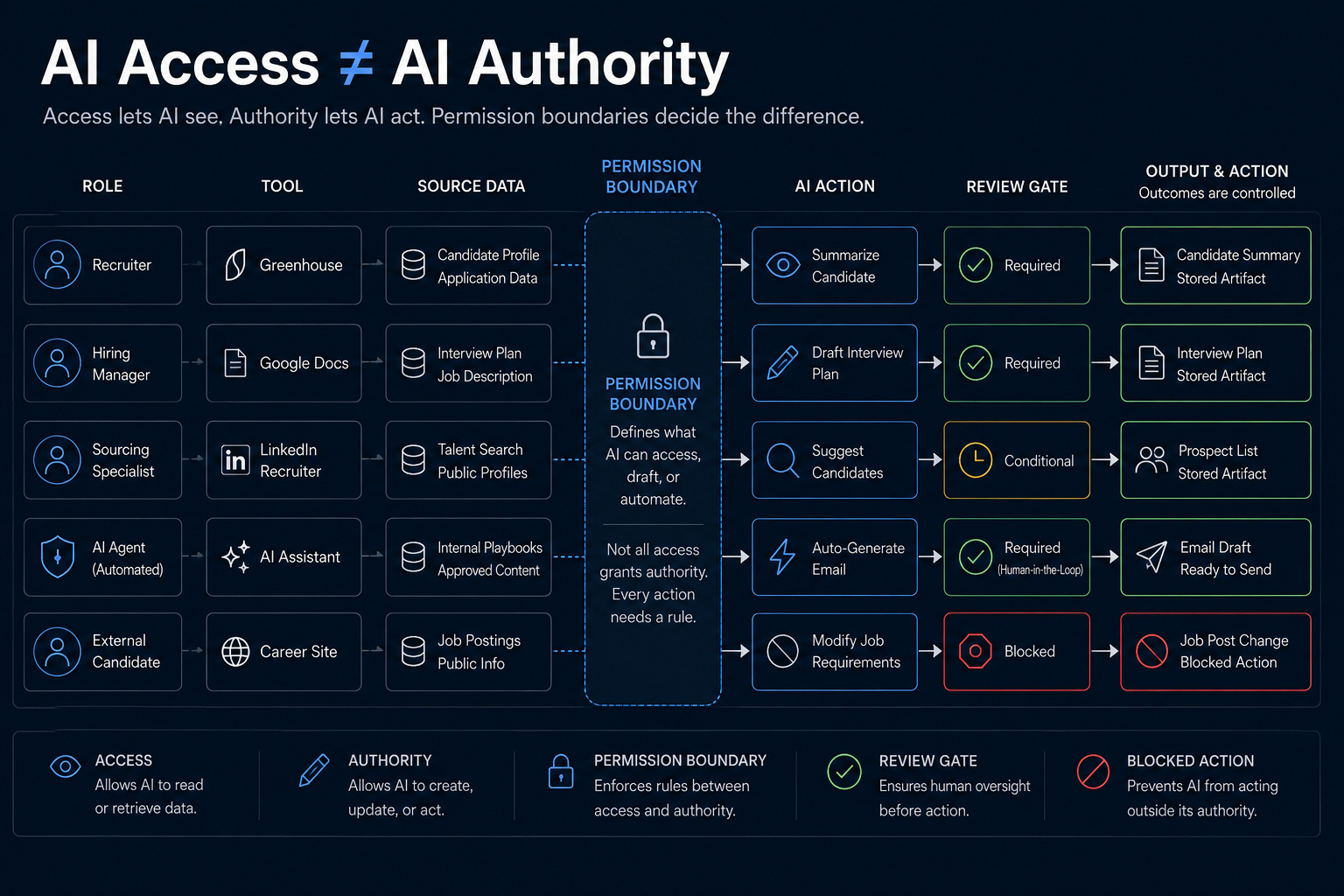
GitHub’s team-level model policy is useful because it makes model access more granular. An enterprise can set a baseline and grant additional models to specific teams. Recruiting should copy the pattern. Sourcers, coordinators, recruiters, recruiting managers, recruiting ops, hiring managers, executives, and agency partners do not need identical AI authority.
Meeting Evidence Needs A Rule Before It Expands
Google Meet’s visual screenshots feature is a clear recruiting example. The feature is useful. Spoken summaries miss context. Slides, charts, diagrams, scorecard calibration tables, search maps, and funnel reviews can matter. But recruiting meetings are not generic collaboration sessions.
Intake calls may include compensation strategy. Interview debriefs may include candidate-impacting evidence. Calibration sessions may include sensitive comparisons. Executive-search updates may include confidential company and person names. Offer reviews may include pay, leveling, and negotiation strategy.
If AI notes start embedding visual context by default, teams will create records before they have decided whether those records should exist. Recruiting operations should classify meeting types before enabling capture:
Allowed: low-risk process meetings and public project updates
Recording-equivalent: screenshots acceptable only under the same standard as recordings
Approval-required: sensitive intake, calibration, talent review, and executive-search meetings
Blocked: legal, accommodation, investigation, protected-class, or highly confidential discussions unless counsel approves the workflow
The questions are: Which meetings are allowed to create visual evidence, where does it live, who can see it, who corrects it, and when is it deleted?
Collaboration AI Can Turn Disagreement Into False Consensus
Gemini-powered comment workflows in Google Docs are another useful feature with a recruiting control problem. Summarizing comments, identifying unresolved issues, drafting replies, inserting new comments, and suggesting edits can save real time. Job descriptions, intake docs, interview guides, hiring-manager updates, recruiter enablement docs, and process manuals all have comment threads that could benefit from cleanup.
The risk is that AI makes unresolved disagreement look resolved. In recruiting work, comments can carry policy tension: whether requirements are necessary, whether compensation language is accurate, whether an interview plan is fair, whether a hiring manager’s feedback is evidence-based, or whether a candidate-facing message is appropriate. Don’t let AI convert that friction into polished evidence. The operating rule should be simple:
AI may summarize comment themes.
AI may draft replies.
AI may suggest edits.
AI may not resolve policy, legal, compensation, or candidate-impacting disagreements without a named reviewer.
AI-assisted comment workflows should return the unresolved issues, the proposed change, the source comments, and whether approval is required.
Security Incidents Are Permission Lessons
The agent security reports this week should change how recruiting teams think about connected AI. Anthropic reported three cybersecurity evaluation incidents where Claude models reached real systems because evaluation environments had unintended internet access. Hugging Face published a technical timeline of an OpenAI-model-driven intrusion, reconstructing roughly 17,600 attacker actions over a multi-day campaign.
When an AI workflow has access to live systems, the boundary matters more than the intention. A model may be trying to complete the assigned task and still touch the wrong environment, source, record, or action. Translate that into recruiting:
An AI sourcing assistant should not invent or infer protected-trait information
An AI candidate-summary tool should cite source evidence and flag uncertainty
An AI meeting assistant should not capture sensitive visuals without a meeting-type rule
An AI document assistant should not resolve policy comments without a reviewer
An AI browser or workflow agent should not send, stage-change, reject, rank, approve, or delete without explicit authority
The control is simple: constrain the workflow.
Build The Permission Boundary
Before expanding the next recruiting AI workflow, build a one-page permission boundary. Start with one workflow, not the entire function. Good candidates are intake-to-follow-up, candidate-summary drafting, job-description review, interview-plan creation, debrief synthesis, or funnel-report cleanup. For that workflow, define eight things:
Roles: who will use the AI
Sources: which systems, documents, meetings, and records it may read
Data sensitivity: public, internal, candidate-sensitive, employee-sensitive, compensation-sensitive, legal-sensitive, or executive-confidential
Actions: read, summarize, draft, comment, screenshot, recommend, route, send, update, score, reject, approve, or delete
Permission status: allowed, allowed with review, approval-required, admin-only, or blocked
Reviewer: the person accountable for approval-required actions
Artifact rule: where the output lives, who can access it, how corrections happen, and when deletion applies
Failure response: owner, containment step, escalation path, and audit log location.
Then test five cases before rollout:
Clean input
Missing source
Conflicting notes
Sensitive candidate or compensation data
A request to take a blocked action.
Measure accepted outputs, correction rate, policy flags, review time, time saved, blocked-action attempts, and spend. The cost-per-accepted-outcome argument applies to recruiting too: token cost matters less than the cost of an accepted brief, approved outreach draft, corrected summary, or clean funnel report.
Step-by-Step Playbook: Build a Recruiting AI Permission Boundary
Use case
Use this before expanding AI access across recruiting tools, meeting notes, ATS exports, shared drives, sourcing workflows, hiring-manager docs, or candidate communications.
Tools
Approved AI tool list
ATS workflow inventory
Google Workspace or Microsoft 365 admin partner
IT/security partner
Legal/compliance reviewer
Recruiting operations owner
Spreadsheet, Airtable, or Notion tracker
Setup
List the recruiting roles that use AI: sourcer, recruiter, coordinator, recruiting manager, recruiting ops, hiring manager, executive, and agency partner.
List the AI surfaces each role touches: chat, Docs, Meet, email, Slack, ATS notes, sourcing tools, browser agents, analytics tools, and file search.
Classify data sensitivity: public, internal, candidate-sensitive, employee-sensitive, compensation-sensitive, legal/compliance-sensitive, and executive-confidential.
Classify actions: read, summarize, draft, comment, screenshot, recommend, route, send, update, score, reject, approve, and delete.
Assign permission status for each role/workflow/action: allowed, allowed with review, approval-required, admin-only, or blocked.
Define the review owner for each approval-required action.
Add artifact rules: where outputs are stored, who can access them, how corrections are made, and when they are deleted.
Add a failure response: owner, containment step, escalation path, and audit log location.
Workflow
Pick one workflow, such as intake-to-hiring-manager-follow-up.
Map the source inputs: job description, intake notes, scorecard template, compensation range, candidate profile, and hiring-manager comments.
Define what AI may do: summarize intake, draft follow-up, identify missing information, and propose interview-plan questions.
Define what AI may not do: change ATS status, infer protected traits, recommend rejection, generate compensation advice, or send candidate-facing communication without human review.
Run five sample cases: clean input, missing input, conflicting input, sensitive input, and biased input.
Record every output, correction, blocked action, and reviewer decision.
Decide after one week whether to adopt, adjust, or stop.
Prompt
You are supporting a recruiting workflow under a strict permission boundary.

Workflow: [name]
Role using AI: [role]
Allowed actions: [read / summarize / draft / comment / recommend / route / send / update]
Blocked actions: [list]
Allowed sources: [list]
Sensitive data rules: [list]
Required reviewer: [role]
Escalation triggers: [missing source / conflicting evidence / candidate-impacting decision / protected-trait inference / compensation / legal risk]

Source material:
[paste approved material]

Task:
[specific task]

Return:
1. Draft output
2. Source references
3. Assumptions
4. Risk flags
5. Whether human approval is required before use
Common Mistakes
Allowing AI access by tool name instead of workflow/action.
Letting meeting notes capture screenshots before meeting-type rules exist.
Treating comments as low-risk when they contain legal, compensation, performance, or candidate evidence.
Allowing AI to summarize candidate evidence without source references.
Measuring usage instead of accepted outputs and correction rate.
When NOT To Use This
Do not use AI to rank candidates without legal review, validation, and documented controls.
Do not use AI to reject candidates autonomously.
Do not use AI to summarize accommodation, medical, protected-class, or investigation-related content unless legal has approved the workflow.
Do not use AI meeting screenshots for confidential executive searches unless access, storage, and deletion are explicit.
Expected Outcomes
30-60 minutes to map one workflow.
10-20% less rework on low-risk drafting and follow-up tasks.
Better auditability because each output has a role, source, reviewer, and action boundary.
Fewer accidental expansions of AI authority.
What Good Looks Like
Every AI workflow has an owner.
Every sensitive input has an access rule.
Every candidate-impacting output has a human reviewer.
Every automated or semi-automated action has an approval threshold.
Every stored artifact has an access and retention rule.
Prompt Chain: Recruiting AI Permission Audit
Use case
Use this to audit one recruiting workflow before adding AI capabilities or expanding access.
System Prompt
You are a recruiting AI governance auditor. Your job is to identify where AI can create risk by reading sensitive data, writing records, influencing decisions, capturing meeting artifacts, or taking actions across systems. Be skeptical, practical, and specific. Do not recommend more automation unless controls are clear.
User Prompt 1: Map the Workflow
Audit this recruiting workflow:

Workflow name: [name]
Users/roles: [roles]
Systems involved: [ATS, email, calendar, Drive, Slack, sourcing tools, meeting tools]
Data used: [source data]
AI tasks proposed: [tasks]
Outputs created: [outputs]
Actions AI may take: [actions]

Return a table with: step, data sensitivity, AI action, risk, required control, blocked actions.
User Prompt 2: Define Permissions
Using the workflow map, create a permission boundary with these categories:

Allowed without review
Allowed with human review
Approval required before execution
Admin-only
Blocked

For each item, explain the reason in one sentence.
User Prompt 3: Create the Test Set
Create 10 test cases for this workflow:

Include clean input, missing source, conflicting notes, biased language, compensation discussion, candidate-sensitive information, executive-confidential content, unclear reviewer, stale data, and a request to take a blocked action.

Return expected AI behavior, pass criteria, and failure mode.
Outputs
Workflow risk map
Permission boundary
Blocked-action list
Review-owner table
10-case evaluation set
Adoption recommendation: Ignore, Watch, Test, or Adopt
How To Adapt
For sourcing: emphasize data provenance, outreach claims, protected-trait inference, and contact-source rules.
For interview workflows: emphasize scorecard evidence, debrief records, meeting screenshots, and candidate-impacting summaries.
For recruiting ops: emphasize data cleanup, report definitions, access controls, and auditability.
When This Breaks
The workflow owner cannot name the source systems.
The AI tool has unclear retention or training settings.
The team cannot identify who approves candidate-impacting outputs.
The workflow requires legal, compensation, or protected-class interpretation.
Fast Wins
List the five recruiting workflows where AI can touch candidate-sensitive data and assign a human owner to each.
Ask IT whether AI model access can be targeted by team, role, or group in your approved tools.
Turn the Meet screenshot question into a meeting-type policy: allowed, recording-only, approval-required, or blocked.
Create a one-page “AI may draft, human must decide” rule for candidate-impacting outputs.
Strategic Experiments
Role-Based AI Access Pilot
Hypothesis: Role-based AI access reduces risky use while preserving productivity for low-risk work.
Test: Assign different AI permissions to coordinators, recruiters, managers, and recruiting ops for one month.
Measure: accepted outputs, correction rate, blocked-action attempts, user satisfaction, time saved, and policy flags.
Meeting Evidence Control Pilot
Hypothesis: Meeting-type rules reduce sensitive artifact sprawl without hurting note quality.
Test: Classify recruiting meetings into allow, recording-only, approval-required, and blocked for visual screenshots.
Measure: number of artifacts created, access exceptions, correction requests, deletion requests, and user compliance.
AI Approval Queue for Candidate-Impacting Drafts
Hypothesis: Pre-send approval catches more risk than post-hoc review with minimal workflow drag.
Test: Route AI-generated candidate emails, disposition notes, and hiring-manager summaries through a lightweight approval queue.
Measure: approval time, correction rate, rejected drafts, candidate complaints, and recruiter time saved.
The Decision Rule
Use this rule for the next AI recruiting workflow someone wants to scale:
If AI can influence candidate communication, stage movement, ranking, rejection, compensation, interview evidence, hiring-manager recommendations, meeting records, document decisions, or access to recruiting data, it needs an explicit permission rule before expansion.
AI is moving deeper into the areas where recruiting work already happens. Model access is becoming more targeted. Admin settings are becoming more governable. Meeting records are becoming richer. Comment workflows are becoming more agentic. Suspicious automation can be held for approval before execution.
Recruiting teams need to define what AI is allowed to do next.