

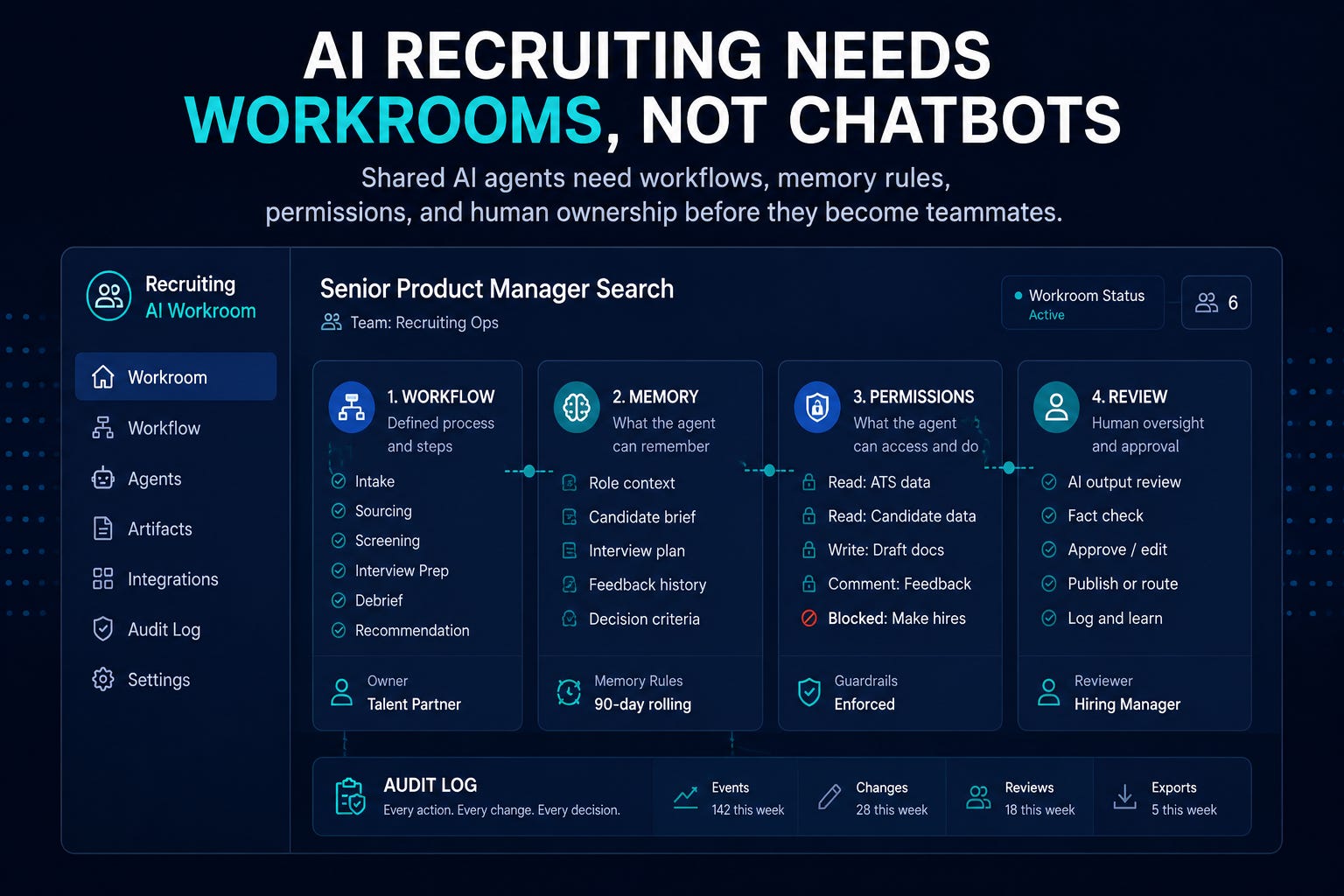
AI isn’t moving from GPT-4 to GPT-5. It’s moving from private chats into shared work channels, persistent memory, governed automation, auditable spend, enterprise backups, and admin-controlled tool surfaces.
The recruiting takeaway is that if AI is becoming a teammate, it needs a job description, permissions, memory rules, review logs, and a manager. Otherwise you are giving a probabilistic system social context, candidate data, and operational authority without an operating model.
2-Minute Skim
3 things to know
Anthropic launched Claude Tag in Slack beta for Claude Team and Enterprise: channel-scoped agents that can remember context, take initiative, use tools, and log work.
OpenAI published internal Codex adoption data showing agents becoming the primary AI interface across non-technical functions, including recruiting.
Microsoft warned that AI memory changes the threat model: attackers can poison persistent memory and influence later tool use outside the original context.
2 things to test
Create one private recruiting AI workroom for a low-risk workflow, such as intake cleanup or hiring-manager follow-up drafts, with explicit permissions and a weekly review log.
Build a memory control checklist: what the AI may remember, where memory is stored, who can inspect it, how it is deleted, and what source/provenance is required.
1 thing to ignore
Generic claims that agents will become “digital coworkers.” That framing is only useful if it includes scope, data access, auditability, escalation, and blocked actions.
Patterns
AI work is moving into shared surfaces: Slack channels, Jira, Sheets, Apps Script, GitHub reports, and enterprise dashboards.
Memory is becoming an operating risk. Persistent context needs provenance, inspection, deletion, and incident response.
Admin controls are catching up: cost centers, plugin allowlists, Workspace core-service protections, backups, group classification, and privileged-account alerts.
Agent value is moving from “answer generation” to long-running delegated work with artifacts, logs, and review points.
The maturity gap is workflow design, permissioning, and evidence discipline.
Executive Brief
What changed this week: AI collaboration became more operational. Claude Tag puts an agent inside Slack channels with scoped access, memory, tool use, spend controls, and logs. OpenAI’s Codex research shows agentic work spreading into recruiting, legal, finance, and operations, not just engineering. Microsoft detailed why AI memory needs provenance, audit logs, lifecycle controls, and deterministic boundaries. Google made Apps Script a Workspace core service, improved Workspace backups with incremental exports, and tightened admin/security controls. GitHub continued adding cost attribution, adoption-phase reporting, and plugin governance.
What most teams will get wrong: they will treat shared agents like smarter chatbots. They will add an agent to a channel, let it observe messy human work, connect tools too broadly, and assume “team visibility” equals governance. It does not.
What to do instead: start with one scoped recruiting workroom. Define the workflow, the data boundary, the allowed tools, the memory policy, the human reviewer, the output standard, the deletion/retention rule, the audit log, and the escalation path. If you cannot explain what the agent is allowed to know and do, it should not be in the workflow.
Related: AI Access Is Not an Operating Model — because governing AI work starts with understanding how work changes, not who has a license.
What Matters This Week
Here’s what this week’s announcements reveal about where enterprise AI is actually heading.
1. Claude Tag turns Slack into a shared agent workspace.
Claude can now join selected Slack channels, build scoped channel memory, use approved tools, work asynchronously, take initiative when enabled, and log what it did and who requested it.
Recruiting use case: Use a private recruiting ops channel to delegate intake cleanup, hiring-manager follow-up drafts, req status summaries, interview-plan drafts, or weekly funnel questions.
Takeaway: Treat channel agents as managed workers, not ambient assistants. If an agent can remember the channel and use tools, it needs a manager before it needs enthusiasm.
2. OpenAI says agents became the primary AI tool for recruiting internally.
OpenAI reported that Codex became the primary AI tool across departments, including recruiting, and that non-developer adoption grew faster than developer adoption.
Recruiting use case: Use agents for structured execution work: data cleanup, workflow automation, report assembly, job-description QA, and process documentation.
Takeaway: Move beyond prompt templates toward delegated work packets with verification steps. Recruiting teams should not copy OpenAI’s usage volume. They should copy the shift from chat to managed task execution.
3. Microsoft made the AI memory risk concrete.
Microsoft explained how memory turns single-turn attacks into persistent risks, including poisoned memories that can influence later behavior and tool calls.
Recruiting use case: Prevent agents from retaining unverified candidate claims, hiring-manager preferences, compensation assumptions, or policy-sensitive notes without source provenance and review.
Takeaway: Memory needs lifecycle controls: source, write approval, retrieval risk, audit logs, edit/delete rights, and incident response. “The AI remembered it” is not evidence. It is a liability unless you know where the memory came from.
4. Google Apps Script becoming a Workspace core service makes lightweight recruiting automation more defensible.
Apps Script now has core-service coverage, enterprise-grade data protection, admin controls, and standard technical support across Workspace.
Recruiting use case: Build small automations for spreadsheet QA, interview-plan assembly, requisition trackers, debrief reminders, and hiring-manager status updates.
Takeaway: Revisit low-risk recruiting ops automations that were previously blocked for compliance or support reasons. This is not a license to let every recruiter write scripts. It is a chance for recruiting ops to replace manual spreadsheet rituals with governed micro-automation.
5. Google Workspace incremental exports improve AI artifact backup discipline.
Workspace admins can schedule scoped incremental backups for Gmail, Drive, and Chat into Google Cloud Storage, reducing backup cost and enabling more frequent snapshots.
Recruiting use case: Preserve recruiting communications, AI-assisted artifacts, interview coordination records, and process evidence by OU, group, or user scope.
Takeaway: If AI work happens in Workspace, backup strategy needs to include the artifacts AI creates and modifies.Retention policy without recoverability is theater.
6. GitHub tied cost centers to enterprise teams.
GitHub Enterprise can now attribute usage to team-based cost centers with membership updated through team changes or SCIM, supporting budgets and caps by group.
Recruiting use case: Apply the same structure to TA AI spend: recruiting ops, sourcing, coordination, executive search, campus, and hiring-manager enablement should have different usage profiles.
Takeaway: AI budget should map to work units, not generic license pools.If every team has the same AI budget, you are not managing value. You are managing procurement convenience.
If an agent can remember the channel and use tools, it needs a manager before it needs enthusiasm.
Overhyped Theme
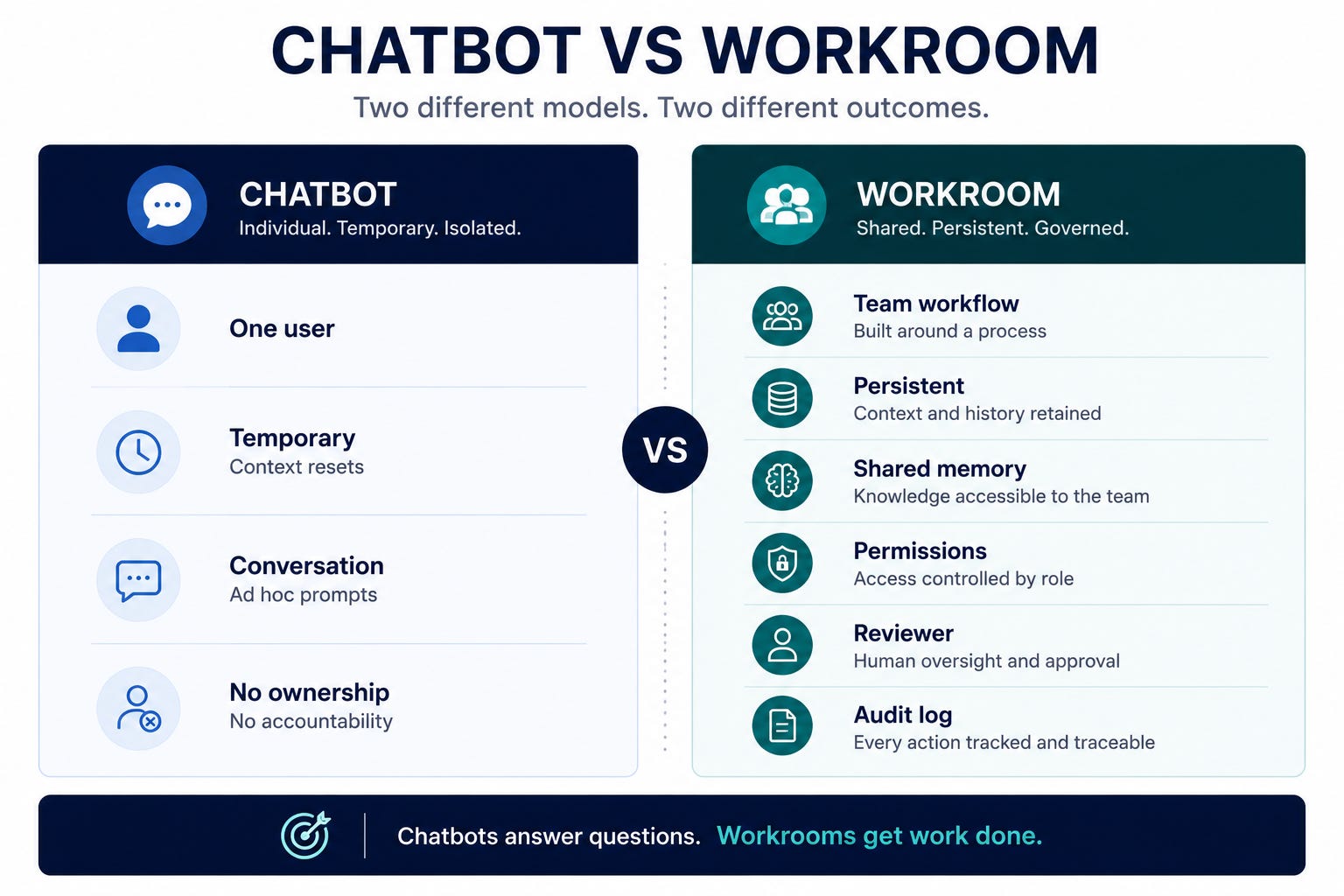
Digital coworker language is overhyped. A coworker has role clarity, manager oversight, access boundaries, performance expectations, escalation rules, and consequences. Most AI agents have a vague prompt, broad context, unclear memory, and no operating cadence. Do not use the coworker metaphor unless you are willing to manage the agent like work infrastructure.
Mistake Most Teams Will Make
They will put agents in shared channels before defining what the agent is allowed to remember. That is backwards. Memory is not convenience. In recruiting, memory can become evidence, bias, stale context, confidential information, or a future prompt-injection surface.
Step-by-Step Playbook: Stand Up a Recruiting AI Workroom
A recruiting AI workroom is a persistent workspace built around a single recruiting workflow, with defined inputs, permissions, memory, review, and ownership.
Use case
Use this when you want AI to support a recurring recruiting workflow with team visibility: intake cleanup, hiring-manager follow-up, weekly funnel updates, interview-plan drafts, sourcing research, or recruiting ops reporting.
Tools
Claude Tag, Microsoft 365 Copilot agents, Gemini, ChatGPT Enterprise, or another enterprise AI assistant
Slack or Teams private channel
ATS/report export, role brief, scorecard, interview plan, and approved process docs
Shared review tracker in Sheets, Airtable, Notion, or your ATS project space
IT/legal input for memory, retention, deletion, and tool access
Setup
Pick one low-risk workflow with recurring work and obvious human review.
Create a private channel named for the workflow, not the tool, such as
req-intake-cleanup-ai.Add only the recruiters, recruiting ops owner, and hiring stakeholders needed for that workflow.
Define the agent job description in the channel description.
Connect only the minimum sources required: role brief, scorecard template, interview process doc, and sanitized workflow examples.
Keep ATS write access off for the first test.
Disable proactive/ambient behavior unless you have a review routine.
Define memory rules before the first task.
Agent Job Description
Purpose: Support the team with intake cleanup, follow-up drafts, and workflow summaries for one approved requisition.

Allowed inputs:
- Role brief
- Hiring-manager intake notes
- Approved scorecard template
- Interview plan template
- Public company and role context

Allowed outputs:
- Clarifying questions
- Draft follow-up messages
- Intake summary with cited sources
- Missing-information checklist
- Interview-plan draft for human review

Blocked actions:
- Do not rank candidates
- Do not recommend rejection or advancement
- Do not infer protected traits
- Do not create compensation guidance
- Do not send messages externally
- Do not modify ATS records
- Do not store unverified preferences as memory

Human owner: Recruiting ops lead
Reviewer: Assigned recruiter
Review cadence: Weekly for the pilot
Memory Rules
The agent may remember:
- Approved workflow preferences
- Template locations
- Team terminology
- Non-sensitive process rules

The agent may not remember:
- Candidate-specific judgments
- Protected-class information
- Compensation expectations
- Unverified hiring-manager opinions
- Rejection rationale
- Interview feedback
- Anything from external web pages unless source provenance is retained

Every memory must have:
- Source
- Date
- Requesting human
- Reason it is useful
- Review/delete owner
Workflow
Human posts source material and asks for a bounded output.
Agent returns a draft with citations or source references.
Human reviewer marks output as accepted, edited, rejected, or policy issue.
Reviewer logs correction category: missing evidence, wrong emphasis, invented fact, sensitive data, tone, policy, or not useful.
Agent is allowed to update memory only for approved process preferences.
Recruiting ops reviews logs weekly and decides expand, restrict, retrain, or stop.
Pilot Prompt
You are supporting a recruiting intake workflow.

Use only the source material in this channel and the approved templates. If information is missing, ask questions instead of guessing.

Create:
1. A concise intake summary
2. Missing-information checklist
3. Hiring-manager follow-up draft
4. Interview-plan risks to review

Rules:
- Cite the source for every requirement or claim
- Do not rank candidates
- Do not infer protected traits
- Do not create compensation guidance
- Do not store candidate-specific information as memory
- Flag anything that could influence a hiring decision
Common Mistakes
Giving the agent access to full ATS records before proving output quality.
Letting it observe broad recruiting channels with candidate, compensation, and employee data.
Enabling proactive behavior without a review log.
Treating memory as harmless personalization.
Measuring success only by time saved instead of correction rate and policy flags.
When NOT To Use This
Candidate ranking, rejection, or stage movement.
Interview scoring or competency assessment.
Sensitive employee relations, accommodations, immigration, medical, or compensation discussions.
Any workflow where the team cannot inspect what the agent used or remembered.
Expected Outcomes
20-40 minutes saved per intake cleanup or weekly req update.
Better consistency in follow-up questions and role documentation.
Fewer missing intake details before sourcing starts.
A usable review log showing where AI helps, where it fails, and whether the workflow is safe to expand.
What Good Looks Like
Outputs cite their source.
Reviewers can explain every change they made.
Memory is scoped and inspectable.
The agent refuses blocked actions.
The team has fewer status meetings, not more AI cleanup work.
Prompt Chain: Recruiting AI Memory Audit
Use case
Use this to review what an AI assistant or channel agent should remember before you allow it into a recruiting workflow.
System Prompt
You are a recruiting AI governance reviewer. Your job is to decide what an AI assistant may remember, what it must forget, and what requires human approval.

Be skeptical. Recruiting data can affect trust, fairness, legal defensibility, and candidate experience.

Classify each proposed memory as: allow, allow with source, human approval required, or block.

Rules:
- Candidate-specific evaluations are blocked unless explicitly required by policy and retained in the system of record.
- Protected traits, inferred traits, health, immigration, compensation sensitivity, and accommodations are blocked.
- Hiring-manager preferences must be tied to approved job criteria or marked as unverified.
- Process preferences may be allowed if they are non-sensitive and useful.
- Every allowed memory needs source, date, owner, and deletion path.
User Prompt 1
Review these proposed memories for a recruiting AI workroom:

[Paste proposed memories, channel context, workflow, and connected tools]

Return a table with:
- Memory
- Classification
- Reason
- Required source/provenance
- Risk
- Deletion/review owner
- Recommended rewrite if allowed
User Prompt 2
Now convert the approved items into a memory policy for the channel.

Include:
- What the agent may remember
- What it may not remember
- When human approval is required
- How often memory should be reviewed
- What to do if a memory is wrong or harmful
User Prompt 3
Create a reviewer checklist for the recruiting ops owner to use weekly.

Keep it under 12 checks. Focus on evidence, sensitive data, stale context, tool use, and blocked actions.
Outputs
Memory risk table
Channel memory policy
Weekly reviewer checklist
Blocked-memory examples
How To Adapt
For sourcing, add external web provenance and no unsupervised outreach.
For interviews, block scoring, ranking, and evaluation memory.
For executive search, add confidentiality and restricted-access controls.
For recruiting ops reporting, emphasize data freshness and metric definitions.
When This Breaks
The agent cannot expose or audit memory.
The vendor cannot explain retention or deletion behavior.
The workflow mixes candidate evaluation with administrative work.
Humans keep asking the agent to “remember” informal preferences that are not job-related.
If you're experimenting with shared AI workspaces or recruiting agents, reply with the workflow you're testing. I'd like to feature practical examples in a future issue.
Fast Wins
Pick one recruiting workflow and write its agent job description: purpose, inputs, allowed actions, blocked actions, reviewer, and output format.
Ask IT whether AI memory is enabled in your enterprise tools and whether memory events are auditable.
Create a private Slack or Teams channel for one AI-assisted workflow and restrict it to internal, non-candidate-sensitive work first.
Add a “source/provenance required” rule to every AI-generated intake summary, candidate packet, or hiring-manager update.
Ask finance or IT to map AI spend by team or workflow, not just by user count.
Strategic Experiments
1. Private AI Workroom for Intake Cleanup
Hypothesis: A scoped channel agent can reduce intake cleanup time while improving consistency.
Test: Run 5 intakes through the workroom with source-cited summaries and human review.
Measure: Time saved, missing-info reduction, correction rate, policy flags, hiring-manager satisfaction.
2. Recruiting AI Memory Control Review
Hypothesis: Most AI risk comes from persistent, unreviewed context rather than one bad prompt.
Test: Audit all remembered preferences and channel context for one workflow.
Measure: Blocked memories, stale memories, missing provenance, deletion gaps, reviewer confidence.
3. TA AI Cost and Value Map
Hypothesis: AI spend is currently misallocated because it is tracked by license, not workflow value.
Test: Map one month of usage to workflow category and correction rate.
Measure: Cost per workflow, accepted-output rate, time saved, quality flags, workflows to expand or restrict.
Previously In The Series
The teams that benefit most from AI won’t have the smartest prompts. They’ll have the best operating model.
Subscribe to The Recruiting Operator for practical systems to govern, measure, and improve AI-assisted recruiting work.