

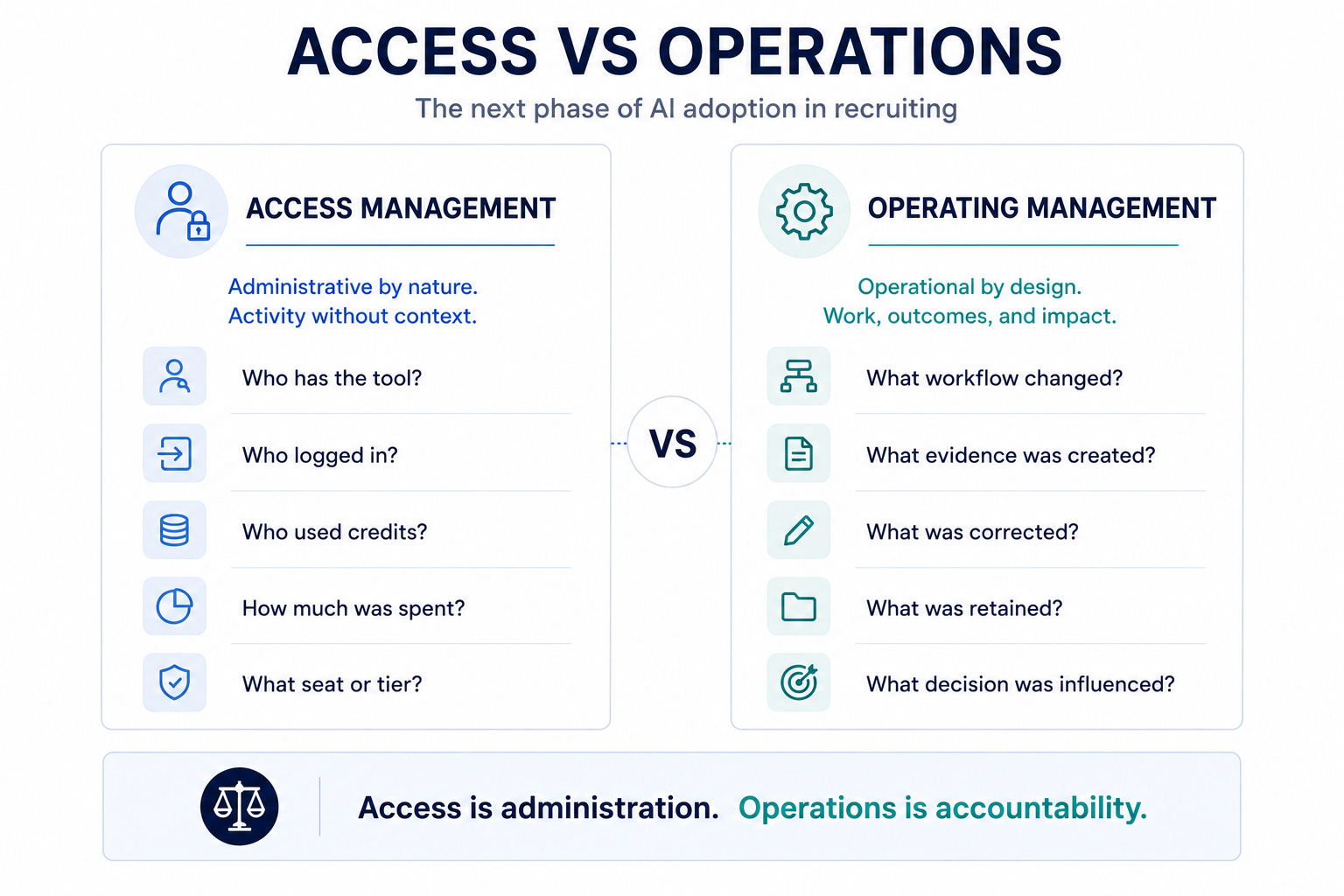
This week was a reset. The signal was the admin layer getting stronger: usage analytics, spend controls, deletion settings, call-note consent, realistic model testing, and agent security warnings.
That matters because many recruiting teams are still managing AI like a license rollout. Who has access? Who has tried it? Who is excited?
The better questions are: what work changed, what did it cost, what evidence was created, what can disappear, what needs review, and where should agents never be allowed to operate? Many organizations are still managing AI access. The next phase is managing AI work. Access tells you who has a tool. Operations tells you what changed because of it.
2-Minute Skim
3 things to know
AI usage is becoming financially and operationally measurable. OpenAI and GitHub both moved toward user-level and credit-level visibility.
AI conversation control is now a legal and governance issue. Gemini admins can control temporary chats and deletion, while Vault retention still overrides when configured.
Browser-capable agents are a security risk when they can reach local tools, MCP servers, credentials, or developer control planes.
2 things to test
Build a 60-minute AI usage review: who used AI, for which recruiting workflows, at what spend level, and with what correction rate.
Test AI call notes on one consenting internal intake call and compare the output against a human recruiter summary.
1 thing to ignore
Company-wide AI rollout stories that do not mention governance, workflow standards, spend visibility, review gates, or evidence capture.
Executive Brief
OpenAI added ChatGPT Enterprise usage analytics and spend controls. GitHub added AI credits consumed per user to Copilot usage metrics. Google gave Workspace admins controls over Gemini temporary chats and conversation deletion. Google Voice added AI call notes with recording disclosure and customizable consent language. Microsoft documented AutoJack, a concrete agent security pattern where a browsing agent can bridge untrusted web content into privileged local services. OpenAI published deployment simulation, a method for predicting model behavior using realistic conversation contexts before release.
Don’t equate rollout with progress. Giving every recruiter access to AI is easy. The hard part is knowing which work improved, which work got riskier, which artifacts are retained, which chats can disappear, which workflows deserve more budget, and which agents should never touch production systems.
Treat recruiting AI like an operating system, not a perk. Define approved workflows, budget rules, evidence standards, deletion and retention behavior, call-recording consent, blocked actions, and agent isolation.
What Matters This Week
1. OpenAI made enterprise AI spend and usage more visible.
ChatGPT Enterprise admins can see granular credit usage by user, product, model, and trend, with updated default, group, and individual spend controls.
Recruiting use case: Track which recruiters and recruiting ops users are consuming AI capacity, which workflows justify it, and where usage should be limited or expanded.
Takeaway: Build an AI budget model around workflows, not enthusiasm. If your highest AI spend is not tied to measurable recruiting output, you do not have an adoption strategy. You have a subsidized habit.
2. Microsoft showed why browser-capable agents need isolation.
Microsoft documented AutoJack, an exploit chain showing how untrusted web content rendered by a browsing agent could reach a privileged local MCP service in a development build of AutoGen Studio. Microsoft fixed the issue before it reached a published PyPI package, but the broader issue remains: an agent that can browse the open web and reach local services can collapse trust.
Recruiting use case: Any sourcing, research, or web-summary agent that browses unknown pages should be isolated from ATS access, credentials, local files, and production systems.
Takeaway: Do not run web-browsing agents with privileged local access. An agent that browses the open web and can touch your systems is not a productivity feature. It is a potential confused deputy.
3. Google added admin controls for Gemini temporary chats and deletion.
Google gave Workspace administrators control over whether users can start temporary Gemini chats or delete conversation history. Google also made clear that configured Vault retention rules still apply.
Recruiting use case: Decide whether recruiters can use temporary chats for candidate or hiring-manager work, and whether deletion is compatible with legal, audit, and process standards.
Takeaway: AI chat deletion is not a user-preference decision for hiring work. If recruiting AI conversations can disappear without a retention standard, you are creating an evidence gap.
4. Google Voice added AI call note-taking with consent mechanics.
Google Voice added AI call notes that record, transcribe, summarize, and store call artifacts. The feature includes an audio disclosure and administrator-configurable consent language.
Recruiting use case: Capture hiring-manager intake calls, agency syncs, process handoffs, or recruiter screens where legally appropriate.
Takeaway: Test call notes on internal hiring-manager workflows before candidate calls. AI notes are useful, but they are also records. Do not turn them on until consent, storage, access, and correction ownership are clear.
5. OpenAI published deployment simulation for realistic model testing.
Deployment Simulation replays realistic conversation contexts against candidate models to estimate undesired behavior before release, including agentic tool-use settings.
Recruiting use case: Build recruiting evals from real sanitized workflow examples instead of synthetic prompts.
Takeaway: Your recruiting AI tests should look like your actual recruiting work. Synthetic prompt tests are where teams go to feel safe. Real workflow tests are where the risk shows up.
6. GitHub added AI credits consumed per user to Copilot usage metrics.
GitHub added per-user, per-day AI credit consumption to its Copilot usage metrics API. That does not make usage a productivity score, but it does make resource consumption more visible.
Recruiting use case: Apply the same model to TA tools: user, workflow, volume, cost, quality, corrections, and policy exceptions.
Takeaway: Usage data without workflow and quality data is incomplete. A leaderboard of AI users is lazy management. A dashboard of exceptions and outcomes is operating discipline.
7. Samsung’s broad ChatGPT and Codex deployment is a scale signal.
Samsung is deploying ChatGPT Enterprise and Codex broadly across technical and non-technical teams.
Recruiting use case: Use this as a benchmark for adoption ambition, but not as proof that your recruiting workflows are ready to scale.
Takeaway: Broad access should follow workflow standards, not replace them. Big-company rollout announcements are useful only if they make you ask what controls they built before access expanded.
Manage AI as work, not access
Access management asks: Who has the tool?
Operating management asks:
What recruiting workflow did the tool touch?
What candidate, employee, or hiring-manager data did it use?
Did the output influence a decision or only reduce administrative work?
What evidence supports the output?
What did a human correct?
Is the artifact retained, deletable, temporary, or unknown?
What did the work cost?
Should this workflow expand, stay constrained, or stop?
This is the operating layer I described in AI Recruiting Needs Task Queues: AI work needs an owner, a reviewer, evidence, and a correction log. Usage data becomes useful only when it connects back to that queue.
The same applies to authority. If a tool can update an ATS, send a message, change a stage, or touch production data, define the permission model first. AI Recruiting Needs Permission lays out the baseline: allowed inputs, allowed actions, blocked actions, approval gates, and audit logs.
Without those connections, an AI dashboard is just a leaderboard. It may reward noisy users, punish cautious users, and tell you nothing about quality.
Run a 60-minute AI usage control review (1 reviewer, 10–20 samples)
You do not need a mature analytics stack to start. Review one week of activity for one recruiting team.
1. Define the workflow categories
Use a small, stable list:
intake and role launch;
sourcing and research;
outreach drafting;
screen or interview preparation;
candidate summaries;
debrief synthesis;
reporting;
scheduling and administration;
training.
Do not start with users. Start with work.
2. Capture the minimum control fields
For each meaningful use, record:
Workflow: What work was being done?
Data touched: Candidate, employee, role, scorecard, email, calendar, or public web?
Output type: Draft, summary, analysis, notes, or system action?
Human review: Required, optional, or missing?
Correction: Accepted, lightly edited, heavily edited, rejected, or unsupported?
Retention: Retained, deletable, temporary, or unknown?
Decision influence: None, indirect, direct, or blocked?
Next action: Expand, keep, restrict, retrain, or stop?
3. Sample outputs, not just activity
Review 10 to 20 outputs. Look for invented facts, missing evidence, wrong emphasis, sensitive-data exposure, criteria drift, and overconfident language.
Time saved without correction data is an incomplete metric. A summary produced in 30 seconds is not efficient if a recruiter spends 15 minutes finding what it missed.
If the output affects screening, interview evaluation, ranking, or rejection, the standard should be higher. As I argued in If You Cannot Audit AI Hiring, Do Not Scale It, decision influence requires traceable evidence and a named human owner.
4. Make one decision in each direction
At the end of the review, choose:
one low-risk workflow to expand;
one workflow that needs better training or a clearer template;
one workflow to restrict until controls improve;
one risky use to stop.
A review that produces no operating decision is reporting theater.
Three controls to set now
First, allocate AI capacity by workflow value, not enthusiasm. High usage may signal a valuable repeatable process, unnecessary rework, or experimentation without a clear outcome. You need quality and workflow context to tell the difference.
Second, treat AI artifacts as records. Call notes, transcripts, summaries, temporary chats, and deletion settings need owners. Start with internal hiring-manager calls before using AI note-taking in candidate conversations. Define consent, storage, access, correction, and retention before rollout.
Third, isolate browsing agents. A sourcing or research agent that opens unknown pages should not share an environment with ATS credentials, local files, unrestricted code execution, or privileged MCP services. Use a sandbox, limited permissions, fake data for testing, and logged outputs.
The goal is to make expansion a defensible operating decision.
Playbook: Build a Recruiting AI Usage Control Review
Use this when AI usage is expanding and leadership needs to know whether it is valuable, risky, or just noisy.
Tools
ChatGPT Enterprise, Gemini, Copilot, ATS AI logs, vendor admin console, or manual survey
Spreadsheet, Airtable, Notion, or BI dashboard
Recruiting workflow taxonomy
Legal/IT input for retention, deletion, and data handling
One reviewer from recruiting operations
Steps
Pick a one-week review window.
List approved AI tools used by the recruiting team.
Export or manually collect user-level activity where available.
Define workflow categories: intake, sourcing, outreach, screen prep, candidate summary, interview prep, debrief synthesis, reporting, scheduling/admin, and training.
Define risk tags: candidate data, employee data, compensation, protected-class risk, decision influence, external web browsing, write access, retention gap, and consent requirement.
Define quality tags: accepted as-is, lightly edited, heavily edited, rejected, missing evidence, hallucinated fact, wrong tone, policy concern.
Sample 10-20 outputs and score correction type.
Decide next-week actions: expand one workflow, restrict one workflow, retrain one group, stop one risky use.
Prompt
You are a recruiting AI operations auditor.

Review the activity below and classify it by workflow, risk, value, and next action. Be skeptical. Do not assume usage equals value.

Rules:
- Flag any workflow that touches candidate data, compensation, protected traits, interview evaluation, or hiring decisions.
- Separate administrative productivity from decision influence.
- If retention, deletion, consent, or human review is unclear, mark it as a control gap.
- Recommend one of: expand, keep, restrict, retrain, stop.

Output:
1. Usage summary
2. Highest-value workflows
3. Highest-risk workflows
4. Spend or capacity concerns
5. Quality/correction concerns
6. Control gaps
7. Recommended actions for next week
Common Mistakes
Tracking logins instead of workflow impact.
Celebrating power users without checking quality.
Ignoring deletion and temporary chat settings.
Treating meeting transcripts as harmless notes instead of records.
Letting agents browse external sites from machines with privileged access.
What Good Looks Like
Top workflows are named and documented.
High-risk uses are blocked or routed through review.
Usage and spend are visible by user and workflow.
AI outputs include evidence where factual claims matter.
Retention and deletion behavior is known.
Correction categories are tracked weekly.
Prompt Chain: Audit an AI-Assisted Hiring Manager Intake
System Prompt
You are a recruiting operations analyst. Your job is to turn intake material into an execution-ready recruiting brief.

Use only the provided material. Do not invent requirements, compensation, location constraints, interview steps, or evaluation criteria. If something is missing, write `not evidenced` and ask a clear follow-up question.

Separate facts from interpretation. Flag anything that could create bias, inconsistency, unrealistic expectations, or downstream candidate experience risk.
User Prompt 1
Review this intake transcript or AI-generated call note.

Output:
1. Confirmed role facts
2. Must-have criteria with evidence
3. Nice-to-have criteria with evidence
4. Open questions
5. Risk flags
6. Decisions needed before sourcing starts

Material:
[paste transcript, notes, or AI call summary]
User Prompt 2
Convert the intake review into a recruiter execution brief.

Output:
1. Search strategy
2. Screening questions
3. Outreach angle
4. Hiring-manager calibration questions
5. What not to screen for yet because it is not evidenced
6. Candidate experience risks
User Prompt 3
Challenge the brief.

Find:
1. Assumptions that are not supported by the intake material
2. Criteria that may be proxies for bias or pedigree filtering
3. Requirements that conflict with compensation, location, seniority, or market reality
4. Missing decisions that will slow execution this week
5. The one follow-up question most likely to improve hiring quality
This breaks when the transcript is low quality, the hiring manager uses vague criteria, the AI note-taker omits tradeoffs, or recruiters treat the brief as approved instead of sending open questions back.
Fast Wins
Add retained
/deletable/unknown to your AI tool inventory.Turn off temporary AI chats for recruiting work until legal confirms retention expectations.
Run one AI call-note pilot on an internal intake call and compare it to a recruiter summary.
Ask every AI power user: what workflow did this improve, and what did you still have to fix?
Move any experimental web-browsing agent into a sandbox with no ATS credentials.
Strategic Experiments
1. AI usage quality dashboard
Hypothesis: AI value improves when usage is tracked by workflow, correction rate, and decision influence instead of logins.
Test: Review one week of usage for 10 recruiters.
What to measure: time saved, correction rate, rejected outputs, policy flags, high-value repeatable workflows.
2. Consent-aware AI intake notes
Hypothesis: AI call notes improve intake quality if consent, storage, and human correction are defined before rollout.
Test: Pilot on five internal hiring-manager intake calls.
What to measure: missing requirements caught, follow-up questions generated, recruiter time saved, note accuracy, sensitive-data issues.
3. Recruiting agent sandbox
Hypothesis: Web research agents can safely support sourcing only when isolated from production systems and credentials.
Test: Run a sourcing-research agent in a sandbox with public web access, fake candidate data, no ATS credentials, and logged outputs.
What to measure: useful leads, hallucinated facts, unsafe tool attempts, blocked actions, review time.
Scale the work that survives review
The next phase of recruiting AI will be won by teams that can say what work AI touched, what it improved, what it cost, what people corrected, what evidence remains, and what should happen next.
Run the review on one team this week. Expand what survives it. The goal is not more AI activity. The goal is better recruiting work.
Subscribe to The Recruiting Operator for practical systems to govern, measure, and improve AI-assisted recruiting work.